
Only showing posts tagged with "DigitallyCreated Utilities"
Sweeping Yucky LINQ Queries Under the Rug with Expression Tree Rewriting
May 02, 2011 2:06 PM by Daniel Chambers (last modified on May 03, 2011 6:43 AM)
In my last post, I explained some workarounds that you could hack into your LINQ queries to get them to perform well when using LINQ to SQL and SQL CE 3.5. Although those workarounds do help fix performance issues, they can make your LINQ query code very verbose and noisy. In places where you’d simply call a constructor and pass an entity object in, you now have to use an object initialiser and copy the properties manually. What if there are 10 properties (or more!) on that class? You get a lot of inline code. What if you use it across 10 queries and you later want to add a property to that class? You have to find and change it in 10 places. Did somebody mention code smell?
In order to work around this issue, I’ve whipped up a small amount of code that allows you to centralise these repeated chunks of query code, but unlike the normal (and still recommended, if you don’t have these performance issues) technique of putting the code in a method/constructor, this doesn’t trigger these performance issues. How? Instead of the query calling into an external method to execute your query snippet, my code takes your query snippet and inlines it directly into the LINQ query’s expression tree. (If you’re rusty on expression trees, try reading this post, which deals with some basic expression trees stuff.) I’ve called this code the ExpressionTreeRewriter.
The Rewriter in Action
Let’s set up a little (and very contrived) scenario and then clean up the mess using the rewriter. Imagine we had this entity and this DTO:
public class PersonEntity
{
    public int ID { get; set; }
    public string FirstName { get; set; }
    public string LastName { get; set; }
}

public class PersonDto
{
    public int EntityID { get; set; }
    public string GivenName { get; set; }
    public string Surname { get; set; }
}
Then imagine this nasty query (if it’s not nasty enough for you, add 10 more properties to PersonEntity and PersonDto in your head):
IQueryable<PersonDto> people = from person in context.People
                               select new PersonDto
                               {
                                   EntityID = person.ID,
                                   GivenName = person.FirstName,
                                   Surname = person.LastName,
                               };
Normally, you’d just put those property assignments in a PersonDto constructor that takes a PersonEntity and then call that constructor in the query. Unfortunately, we can’t do that for performance reasons. So how can we centralise those property assignments, but keep our object initialiser? I’m glad you asked!
First, let’s add some stuff to PersonDto:
public class PersonDto
{
    ...

    public static Expression<Func<PersonEntity,PersonDto>> ToPersonDtoExpression
    {
        get
        {
            return person => new PersonDto
            {
                EntityID = person.ID,
                GivenName = person.FirstName,
                Surname = person.LastName,
            };
        }
    }


    [RewriteUsingLambdaProperty(typeof(PersonDto), "ToPersonDtoExpression")]
    public static PersonDto ToPersonDto(PersonEntity person)
    {
        throw new InvalidOperationException("This method is a marker method and must be rewritten out.");
    }
}
Now let’s rewrite the query:
IQueryable<PersonDto> people = (from person in context.People
                                select PersonDto.ToPersonDto(person)).Rewrite();
Okay, admittedly it’s still not as nice as just calling a constructor, but unfortunately our hands are tied in that respect. However, you’ll notice that we’ve centralised that object initialiser snippet into the ToPersonDtoExpression property and somehow we’re using that by calling ToPersonDto in our query.
So how does this all work? The PersonDto.ToPersonDto static method is what I’ve dubbed a “marker method”. As you can see, it does nothing at all, simply throwing an exception to help with debugging. The call to this method is incorporated into the expression tree constructed for the query (stored in IQueryable<T>.Expression). This is what that expression tree looks like:
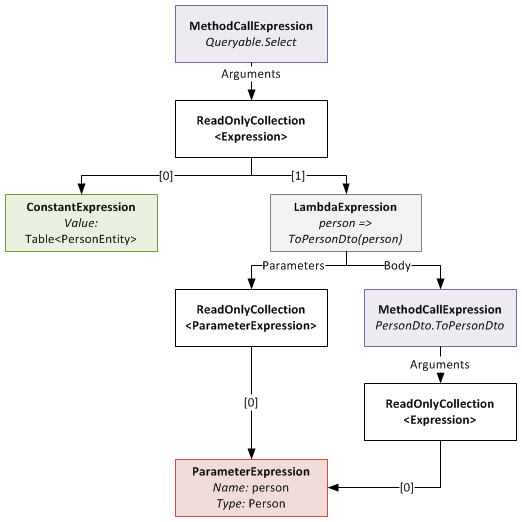
The expression tree before being rewritten
When you call the Rewrite extension method on your IQueryable, it recurs through this expression tree looking for MethodCallExpressions that represent calls to marker methods that it can rewrite. Notice that the ToPersonDto method has the RewriteUsingLambdaPropertyAttribute applied to it? This tells the rewriter that it should replace that method call with an inlined copy of the LambdaExpression returned by the specified static property. Once this is done, the expression tree looks like this:
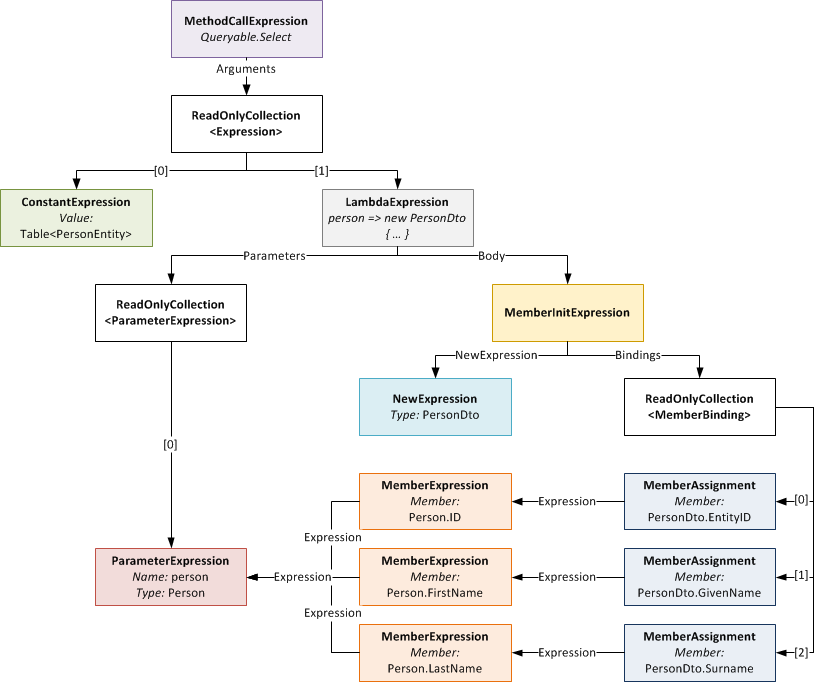
The expression tree after being rewritten (click to enlarge)
Notice that the LambdaExpression’s Body (which used to be the MethodCallExpression of the marker method) has been replaced with the expression tree for the object initialiser.
Something to note: the method signature of marker method and that of the delegate type passed to Expression<T> on your static property must be identical. So if your marker method takes two ClassAs and returns a ClassB, your static property must be of type Expression<Func<ClassA,ClassA,ClassB>> (or some delegate equivalent to the Func<T1,T2,TResult> delegate). If they don’t match, you will get an exception at runtime.
Rewriter Design
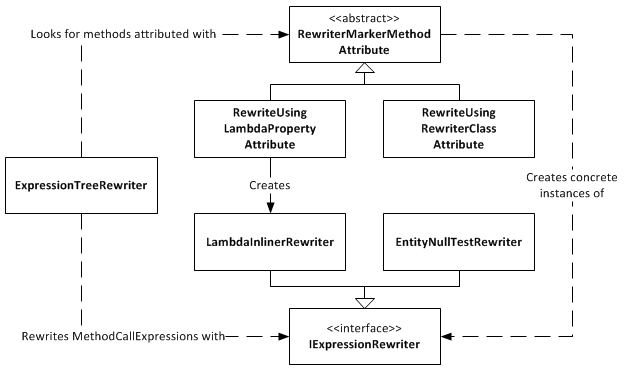
Expression Tree Rewriter Design Diagram
The ExpressionTreeRewriter is the class that implements the .Rewrite() extension method. It searches through the expression tree for called methods that have a RewriterMarkerMethodAttribute on them. RewriterMarkerMethodAttribute is an abstract class, one implementation of which you have already seen. The ExpressionTreeRewriter uses the attribute to create an object implementing IExpressionRewriter which it uses to rewrite the MethodCallExpression it found.
The RewriteUsingLambdaPropertyAttribute creates a LambdaInlinerRewriter properly configured to inline the LambdaExpression returned from your static property. The LambdaInlinerRewriter is called by the ExpressionTreeRewriter to rewrite the marker MethodCallExpression and replace it with the body of the LambdaExpression returned by your static property.
The other marker attribute, RewriteUsingRewriterClassAttribute, allows you to specify a class that implements IExpressionRewriter which will be returned to the rewriter when it wants to rewrite that marker method. Using this attribute gives you low level control over the rewriting as you can create classes that write expression trees by hand.
The EntityNullTestRewriter is one such class. It takes a query with the nasty nullable int performance hack:
IQueryable<IntEntity> queryable = entities.AsQueryable()
    .Where(e => (int?)e.ID != null)
    .Rewrite();
and allows you to sweep that hacky code under the rug, so to speak:
IQueryable<IntEntity> queryable = entities.AsQueryable()
    .Where(e => RewriterMarkers.EntityNullTest(e.ID))
    .Rewrite();
RewriterMarkers.EntityNullTest looks like this:
[RewriteUsingRewriterClass(typeof(EntityNullTestRewriter))]
public static bool EntityNullTest<T>(T entityPrimaryKey)
{
    throw new InvalidOperationException("Should not be executed. Should be rewritten out of the expression tree.");
}
The advantage of EntityNullTest is that people can look at its documentation to see why it’s being used. A person new to the project, or who doesn’t know about the performance hacks, may refactor the int? cast away as it looks like pointless bad code. Using something like EntityNullTest prevents this from happening and also raises awareness of the performance issues.
Give Me The Code!
Enough chatter, you want the code don’t you? The ExpressionTreeRewriter is a part of the DigitallyCreated Utilities BCL library. However, at the time of writing (changeset 4d1274462543), the current release of DigitallyCreated Utilities doesn’t include it, so you’ll need to check out the code from the repository and compile it yourself (easy). The ExpressionTreeRewriter only supports .NET 4, as it uses the ExpressionVisitor class only available in .NET 4; so don’t accidentally use a revision from the .NET 3.5 branch and wonder why the rewriter is not there.
I will get around to making a proper official release of DigitallyCreated Utilities at some point; I’m slowly but surely writing the doco for all the new stuff that I’ve added, and also writing a proper build script that will automate the releases for me and hopefully create NuGet packages too.
Conclusion
The ExpressionTreeRewriter is not something you should just use willy-nilly. If you can get by without it by using constructors and method calls in your LINQ, please do so; your code will be much neater and more understandable. However, if you find yourself in a place like those of us fighting with LINQ to SQL and SQL CE 3.5 performance, a place where you really need to inline lambdas and rewrite your expression trees, please be my guest, download the code, and enjoy.
Automatically recording the Mercurial revision hash using MSBuild
November 12, 2010 2:33 PM by Daniel Chambers
On one of the websites I’ve worked on recently we chose to display the website’s version ID at the bottom of each page. Since we use Mercurial for version control (it’s totally awesome, by the way. I hope to never go back to Subversion), that means we display a truncated copy of the revision’s hash. The website is a pet project and my friend and I manage it informally, so having the hash displayed there allows us to easily remember which version is currently running on Live. It’s an ASP.NET MVC site, so I created a ConfigurationSection that I separated out into its own Revision.config file, into which we manually copy and paste the revision hash just before we upload the new version to the live server. As VS2010’s new web publishing features means that publishing a directly deployable copy of the website is literally a one-click affair, this manual step galled me. So I set out to figure out how I could automate it.
I spent a while digging around in the undocumented mess that is the MSBuild script that backs the web publishing features (as I discussed in a previous blog) and learning about MSBuild and I eventually developed a final implementation which is actually quite simple. The first step was to get the Mercurial revision hash into MSBuild; to do this I developed a small MSBuild task that simply uses the command-line hg.exe to get the hash and parses it out of its console output. The code is pretty self-explanatory, so take a look:
public class MercurialVersionTask : Task
{
    [Required]
    public string RepositoryPath { get; set; }

    [Output]
    public string MercurialVersion { get; set; }

    public override bool Execute()
    {
        try
        {
            MercurialVersion = GetMercurialVersion(RepositoryPath);
            Log.LogMessage(MessageImportance.Low, String.Format("Mercurial revision for repository \"{0}\" is {1}", RepositoryPath, MercurialVersion));
            return true;
        }
        catch (Exception e)
        {
            Log.LogError("Could not get the mercurial revision, unhandled exception occurred!");
            Log.LogErrorFromException(e, true, true, RepositoryPath);
            return false;
        }
    }

    private string GetMercurialVersion(string repositoryPath)
    {
        Process hg = new Process();
        hg.StartInfo.UseShellExecute = false;
        hg.StartInfo.RedirectStandardError = true;
        hg.StartInfo.RedirectStandardOutput = true;
        hg.StartInfo.CreateNoWindow = true;
        hg.StartInfo.FileName = "hg";
        hg.StartInfo.Arguments = "id";
        hg.StartInfo.WorkingDirectory = repositoryPath;
        hg.Start();

        string output = hg.StandardOutput.ReadToEnd().Trim();
        string error = hg.StandardError.ReadToEnd().Trim();

        Log.LogMessage(MessageImportance.Low, "hg.exe Standard Output: {0}", output);
        Log.LogMessage(MessageImportance.Low, "hg.exe Standard Error: {0}", error);

        hg.WaitForExit();

        if (String.IsNullOrEmpty(error) == false)
            throw new Exception(String.Format("hg.exe error: {0}", error));

        string[] tokens = output.Split(' ');
        return tokens[0];
    }
}
I created a new MsBuild project in DigitallyCreated Utilities to house this class (and any others I may develop in the future). At the time of writing, you’ll need to get the code from the repository and compile it yourself, as I haven’t released an official build with it in it yet.
I then needed to start using this task in the website’s project file. A one-liner near the top of the file imports it and makes it available for use:
<UsingTask AssemblyFile="..\lib\DigitallyCreated.Utilities.MsBuild.dll" TaskName="DigitallyCreated.Utilities.MsBuild.MercurialVersionTask" />
Next, I wrote the target that would use this task to set the hash into the Revision.config file. I decided to use the really nice tasks provided by the MSBuild Extension Pack project to do this. This meant I needed to also import their tasks into the project (after installing the pack, of course), in at the top of the file:
<PropertyGroup>
    <ExtensionTasksPath>$(MSBuildExtensionsPath32)\ExtensionPack\4.0\</ExtensionTasksPath>
</PropertyGroup>
<Import Project="$(ExtensionTasksPath)MSBuild.ExtensionPack.tasks" />
Writing the hash-setting target was very easy:
<Target Name="SetMercurialRevisionInConfig">
    <DigitallyCreated.Utilities.MsBuild.MercurialVersionTask RepositoryPath="$(MSBuildProjectDirectory)">
        <Output TaskParameter="MercurialVersion" PropertyName="MercurialVersion" />
    </DigitallyCreated.Utilities.MsBuild.MercurialVersionTask>
    <MSBuild.ExtensionPack.Xml.XmlFile File="$(_PackageTempDir)\Revision.config" TaskAction="UpdateAttribute" XPath="/revision" Key="hash" Value="$(MercurialVersion)" />
</Target>
The MercurialVersionTask is called, which gets the revision hash and puts it into the MecurialVersion property (as specified by the nested Output tag). The XmlFile task sets that hash into the Revision.config, which is found in the directory specified by _PackageTempDir. That directory is the directory that the VS2010 web publishing pipeline puts the project files while it is packaging them for a publish. That property is set by their MSBuild code; it is, however, subject to disappear in the future, as indicated by the underscore in the name that tells you that it’s a ‘private’ property, so be careful there.
Next I needed to find a place in the VS2010 web publishing MSBuild pipeline where I could hook in that target. Thankfully, the pipeline allows you to easily hook in your own targets by setting properties containing the names of the targets you’d like it to run. So, inside the first PropertyGroup tag at the top of the project file, I set this property, hooking in my target to be run after the PipelinePreDeployCopyAllFilesToOneFolder target:
<OnAfterPipelinePreDeployCopyAllFilesToOneFolder>SetMercurialRevisionInConfig;</OnAfterPipelinePreDeployCopyAllFilesToOneFolder>
This ensures that the target will be run after the CopyAllFilesToSingleFolderForPackage target runs (that target is run by the PipelinePreDeployCopyAllFilesToOneFolder target). The CopyAllFilesToSingleFolderForPackage target copies the project files into your obj folder (specifically the folder specified by _PackageTempDir) in preparation for a publish (this is discussed in a little more detail in that previous post).
And that was it! Upon publishing using Visual Studio (or at the command-line using the process detailed in that previous post), the SetMercurialRevisionInConfig target is called by the web publishing pipeline and sets the hash into the Revision.config file. This means that a deployable build of our website can literally be created with a single click in Visual Studio. Projects that use a continuous integration server to build their projects would also find this very useful.
DigitallyCreated Utilities v1.0.0 Released
March 24, 2010 2:43 PM by Daniel Chambers (last modified on June 07, 2010 3:35 PM)
After a hell of a lot of work, I am happy to announce that the 1.0.0 version of DigitallyCreated Utilities has been released! DigitallyCreated Utilities is a collection of many neat reusable utilities for lots of different .NET technologies that I’ve developed over time and personally use on this website, as well as on others I have a hand in developing. It’s a fully open source project, licenced under the Ms-PL licence, which means you can pretty much use it wherever you want and do whatever you want to it. No viral licences here.
The main reason that it has taken me so long to release this version is because I’ve been working hard to get all the wiki documentation on CodePlex up to scratch. After all, two of the project values are:
- To provide fully XML-documented source code
- To back up the source code documentation with useful tutorial articles that help developers use this project
And truly, nothing is more frustrating than code with bad documentation. To me, bad documentation is the lack of a unifying tutorial that shows the functionality in action, and the lack of decent XML documentation on the code. Sorry, XMLdoc that’s autogenerated by tools like GhostDoc, and never added to by the author, just doesn’t cut it. If you can auto-generate the documentation from the method and parameter names, it’s obviously not providing any extra value above and beyond what was already there without it!
So what does DCU v1.0.0 bring to the table? A hell of a lot actually, though you may not need all of it for every project. Here’s the feature list grouped by broad technology area:
- ASP.NET MVC and LINQ
- Sorting and paging of data in a table made easy by HtmlHelpers and LINQ extensions (see tutorial)
- ASP.NET MVC
- HtmlHelpers
- TempInfoBox - A temporary "action performed" box that displays to the user for 5 seconds then fades out (see tutorial)
- CollapsibleFieldset - A fieldset that collapses and expands when you click the legend (see tutorial)
- Gravatar - Renders an img tag for a Gravatar (see tutorial)
- CheckboxStandard & BoolBinder - Renders a normal checkbox without MVC's normal hidden field (see tutorial)
- EncodeAndInsertBrsAndLinks - Great for the display of user input, this will insert <br/>s for newlines and <a> tags for URLs and escape all HTML (see tutorial)
- IncomingRequestRouteConstraint - Great for supporting old permalink URLs using ASP.NET routing (see tutorial)
- Improved JsonResult - Replaces ASP.NET MVC's JsonResult with one that lets you specify JavaScriptConverters (see tutorial)
- Permanently Redirect ActionResults - Redirect users with 301 (Moved Permanently) HTTP status codes (see tutorial)
- Miscellaneous Route Helpers - For example, RouteToCurrentPage (see tutorial)
- HtmlHelpers
- LINQ
- MatchUp & Federator LINQ methods - Great for doing diffs on sequences (see tutorial)
- Entity Framework
- CompiledQueryReplicator - Manage your compiled queries such that you don't accidentally bake in the wrong MergeOption and create a difficult to discover bug (see tutorial)
- Miscellaneous Entity Framework Utilities - For example, ClearNonScalarProperties and Setting Entity Properties to Modified State (see tutorial)
- Error Reporting
- Easily wire up some simple classes and have your application email you detailed exception and error object dumps (see tutorial)
- Concurrent Programming
- Unity & WCF
- WCF Client Injection Extension - Easily use dependency injection to transparently inject WCF clients using Unity (see tutorial)
- Miscellaneous Base Class Library Utilities
- SafeUsingBlock and DisposableWrapper - Work with IDisposables in an easier fashion and avoid the bug where using blocks can silently swallow exceptions (see tutorial)
- Time Utilities - For example, TimeSpan To Ago String, TzId -> Windows TimeZoneInfo (see tutorial)
- Miscellaneous Utilities - Collection Add/RemoveAll, Base64StreamReader, AggregateException (see tutorial)
DCU is split across six different assemblies so that developers can pick and choose the stuff they want and not take unnecessary dependencies if they don’t have to. This means if you don’t use Unity in your application, you don’t need to take a dependency on Unity just to use the Error Reporting functionality.
I’m really pleased about this release as it’s the culmination of rather a lot of work on my part that I think will help other developers write their applications more easily. I’m already using it here on DigitallyCreated in many many places; for example the Error Reporting code tells me when this site crashes (and has been invaluable so far), the CompiledQueryReplicator helps me use compiled queries effectively on the back-end, and the ReaderWriterLock is used behind the scenes for the Twitter feed on the front page.
I hope you enjoy this release and find some use for it in your work or play activities. You can download it here.
C# Using Blocks can Swallow Exceptions
March 05, 2010 3:37 AM by Daniel Chambers (last modified on March 05, 2010 3:49 AM)
While working with WCF for my part time job, I came across this page on MSDN that condemned the C# using block as unsafe to use when working with a WCF client. The problem is that the using block can silently swallow exceptions without you even knowing. To prove this, here’s a small sample:
public static void Main()
{
    try
    {
        using (new CrashingDisposable())
        {
            throw new Exception("Inside using block");
        }
    }
    catch (Exception e)
    {
        Console.WriteLine("Caught exception: " + e.Message);
    }
}

private class CrashingDisposable : IDisposable
{
    public void Dispose()
    {
        throw new Exception("Inside Dispose");
    }
}
The above program will write “Caught exception: Inside Dispose” to the console. But where did the “Inside using block” exception go? It was swallowed by the using block! How this happens is more obvious when you unroll the using block into the try/finally block that it really is (note the outer braces that limit crashingDisposable’s scope):
{
    CrashingDisposable crashingDisposable = new CrashingDisposable();
    try
    {
        throw new Exception("Inside using block");
    }
    finally
    {
        if (crashingDisposable != null)
            ((IDisposable)crashingDisposable).Dispose(); //Dispose exception thrown here
    }
}
As you can see, the “Inside using block” exception is lost entirely. A reference to it isn’t even present and the exception from the Dispose call is the one that gets thrown up.
So, how does this affect you in WCF? Well, when a WCF client is disposed it is closed, which may throw an exception. So if, while using your client object, you encounter an exception that escapes the using block, the client will be disposed and therefore closed, which could throw an exception that will hide the original exception. That’s just bad for debugging.
This is obviously undesirable behaviour, so I’ve written a construct that I’ve dubbed a “Safe Using Block” that stops the exception thrown in the using block from being lost. Instead, the safe using block gathers both exceptions together and throws them up inside an AggregateException (present in DigitallyCreated.Utilities.Bcl, but soon to be found in .NET 4.0) Here’s the above using block rewritten as a safe using block:
new CrashingDisposable().SafeUsingBlock(crashingDisposable =>
{
    throw new Exception("Inside using exception");
});
When this code runs an AggregateException is thrown that contains both the “Inside using exception” exception and the “Dispose” exception. So how does this work? Here’s the code:
public static void SafeUsingBlock<TDisposable>(this TDisposable disposable, Action<TDisposable> action)
    where TDisposable : IDisposable
{
    try
    {
        action(disposable);
    }
    catch (Exception actionException)
    {
        try
        {
            disposable.Dispose();
        }
        catch (Exception disposeException)
        {
            throw new DigitallyCreated.Utilities.Bcl.AggregateException(actionException, disposeException);
        }

        throw;
    }

    disposable.Dispose(); //Let it throw on its own
}
SafeUsingBlock is defined as an extension method off any type that implements IDisposable. It takes an Action delegate, which represents the code to run inside the “using block”. Since the method uses generics, the Action delegate is handed the concrete type of IDisposable you created, not just an abstract IDisposable.
You can use a safe using block in a very similar fashion to a normal using block, except for one key thing: goto-style statements won’t work. So for example, you can’t use return, break, continue, etc inside the safe using block and expect it to affect the method outside. You must keep in mind that you’re writing inside a new anonymous method, not inside a code block.
SafeUsingBlock is part of DigitallyCreated Utilities, however, it is currently only available in the trunk repository, not as a part of a release. Once I’m done working on the documentation, I’ll put it out in a full release.
Speeding up .NET Reflection with Code Generation
December 20, 2009 2:00 PM by Daniel Chambers
One of the bugbears I have with Entity Framework in .NET is that when you use it behind a method in the business layer (think AddAuthor(Author author)) you need to manually wipe non-scalar properties when adding entities. I define non-scalar properties as:
- EntityCollections: the "many" ends of relationships (think Author.Books)
- The single end of relationships (think Book.Author)
- Properties that participate in the Entity Key (primary key properties) (think Author.ID). These need to be wiped as the database will automatically fill them (identity columns in SQL Server)
If you don't wipe the relationship properties when you add the entity object you get an UpdateException when you try to SaveChanges on the ObjectContext.
You can't assume that someone calling your method knows about this Entity Framework behaviour, so I consider it good practice to wipe the properties for them so they don't see unexpected UpdateExceptions floating up from the business layer. Obviously, having to write
author.ID = default(int);
author.Books.Clear();
is no fun (especially on entities that have more properties than this!). So I wrote a method that you can pass an EntityObject to and it will wipe all non-scalar properties for you using reflection. This means that it doesn't need to know about your specific entity type until you call it, so you can use whatever entity classes you have for your project with it. However, calling methods dynamically is really slow. There will probably be lots faster ways of doing it in .NET 4.0 because of the DLR, but for us still back here in 3.5-land it is still slow.
So how can we enjoy the benefits of reflection but without the performance cost? Code generation at runtime, that's how! Instead of using reflection and dynamically calling methods and setting properties, we can instead use reflection once, create a new class at runtime that is able to wipe the non-scalar properties and then reuse this class over and over. How do we do this? With the System.CodeDom API, that's how (maybe in .NET 4.0 you could use the expanded Expression Trees functionality). The CodeDom API allows you to literally write code at runtime and have it compiled and loaded for you.
The following code I will go through is available as a part of DigitallyCreated Utilities open source libraries (see the DigitallyCreated.Utilities.Linq.EfUtil.ClearNonScalarProperties() method).
What I have done is create an interface called IEntityPropertyClearer that has a method that takes an object and wipes the non-scalar properties on it. Classes that implement this interface are able to wipe a single type of entity (EntityType).
public interface IEntityPropertyClearer
{
    Type EntityType { get; }

    void Clear(object entity);
}
I then have a helper abstract class that makes this interface easy to implement by the code generation logic by providing a type-safe method (ClearEntity) to implement and by doing some boilerplate generic magic for the EntityType property and casting in Clear:
public abstract class AbstractEntityPropertyClearer<TEntity> : IEntityPropertyClearer
    where TEntity : EntityObject
{
    public Type EntityType
    {
        get { return typeof(TEntity); }
    }

    public void Clear(object entity)
    {
        if (entity is TEntity)
            ClearEntity((TEntity)entity);
    }

    protected abstract void ClearEntity(TEntity entity);
}
So the aim is to create a class at runtime that inherits from AbstractEntityPropertyClearer and implements the ClearEntity method so that it can clear a particular entity type. I have a method that we will now implement:
private static IEntityPropertyClearer GeneratePropertyClearer(EntityObject entity)
{
    Type entityType = entity.GetType();
    ...
}
So the first thing we need to do is to create a "CodeCompileUnit" to put all the code we are generating into:
CodeCompileUnit compileUnit = new CodeCompileUnit();
compileUnit.ReferencedAssemblies.Add(typeof(System.ComponentModel.INotifyPropertyChanging).Assembly.Location); //System.dll
compileUnit.ReferencedAssemblies.Add(typeof(EfUtil).Assembly.Location);
compileUnit.ReferencedAssemblies.Add(typeof(EntityObject).Assembly.Location);
compileUnit.ReferencedAssemblies.Add(entityType.Assembly.Location);
Note that we get the path to the assemblies we want to reference from the actual types that we need. I think this is a good approach as it means we don't need to hardcode the paths to the assemblies (maybe they will move in the future?).
We then need to create the class that will inherit from AbstractEntityPropertyClearer and the namespace in which this class will reside:
//Create the namespace
string namespaceName = typeof(EfUtil).Namespace + ".CodeGen";
CodeNamespace codeGenNamespace = new CodeNamespace(namespaceName);
compileUnit.Namespaces.Add(codeGenNamespace);

//Create the class
string genTypeName = entityType.FullName.Replace('.', '_') + "PropertyClearer";
CodeTypeDeclaration genClass = new CodeTypeDeclaration(genTypeName);
genClass.IsClass = true;
codeGenNamespace.Types.Add(genClass);

Type baseType = typeof(AbstractEntityPropertyClearer<>).MakeGenericType(entityType);
genClass.BaseTypes.Add(new CodeTypeReference(baseType));
The namespace we create is the namespace of the utility class + ".CodeGen". The class's name is the entity's full name (including namespace) where all "."s are replaced with "_"s and PropertyClearer appended to it (this will stop name collision). The class that the generated class will inherit from is AbstractEntityPropertyClearer but with the generic type set to be the type of entity we are dealing with (ie if the method was called with an Author, the type would be AbstractEntityPropertyClearer<Author>).
We now need to create the ClearEntity method that will go inside this class:
CodeMemberMethod clearEntityMethod = new CodeMemberMethod();
genClass.Members.Add(clearEntityMethod);
clearEntityMethod.Name = "ClearEntity";
clearEntityMethod.ReturnType = new CodeTypeReference(typeof(void));
clearEntityMethod.Parameters.Add(new CodeParameterDeclarationExpression(entityType, "entity"));
clearEntityMethod.Attributes = MemberAttributes.Override | MemberAttributes.Family;
Counterintuitively (for C# developers, anyway), "protected" scope is called MemberAttributes.Family in CodeDom.
We now need to find all EntityCollection properties on our entity type so that we can generate code to wipe them. We can do that with a smattering of LINQ against the reflection API:
IEnumerable<PropertyInfo> entityCollections =
        from property in entityType.GetProperties()
        where
          property.PropertyType.IsGenericType &&
          property.PropertyType.IsGenericTypeDefinition == false &&
          property.PropertyType.GetGenericTypeDefinition() ==
          typeof(EntityCollection<>)
        select property;
We now need to generate statements inside our generated method to call Clear() on each of these properties:
foreach (PropertyInfo propertyInfo in entityCollections)
{
    CodePropertyReferenceExpression propertyReferenceExpression = new CodePropertyReferenceExpression(new CodeArgumentReferenceExpression("entity"), propertyInfo.Name);
    clearEntityMethod.Statements.Add(new CodeMethodInvokeExpression(propertyReferenceExpression, "Clear"));
}
On line 3 above we create a CodePropertyReferenceExpression that refers to the property on the "entity" variable which is an argument that we defined for the generated method. We then add to the method an expression that invokes the Clear method on this property reference (line 4). This will give us statements like entity.Books.Clear() (where entity is an Author).
We now need to find all the single-end-of-a-relationship properties (like book.Author) and entity key properties (like author.ID). Again, we use some LINQ to achieve this:
//Find all single multiplicity relation ends
IEnumerable<PropertyInfo> relationSingleEndProperties =
        from property in entityType.GetProperties()
        from attribute in property.GetCustomAttributes(typeof(EdmRelationshipNavigationPropertyAttribute), true).Cast<EdmRelationshipNavigationPropertyAttribute>()
        select property;

//Find all entity key properties
IEnumerable<PropertyInfo> idProperties =
        from property in entityType.GetProperties()
        from attribute in property.GetCustomAttributes(typeof(EdmScalarPropertyAttribute), true).Cast<EdmScalarPropertyAttribute>()
        where attribute.EntityKeyProperty
        select property;
We then can iterate over both these sets in the one foreach loop (by using .Concat) and for each property we will generate a statement that will set it to its default value (using a default(MyType) expression):
//Emit assignments that set the properties to their default value
foreach (PropertyInfo propertyInfo in relationSingleEndProperties.Concat(idProperties))
{
    CodeExpression defaultExpression = new CodeDefaultValueExpression(new CodeTypeReference(propertyInfo.PropertyType));

    CodePropertyReferenceExpression propertyReferenceExpression = new CodePropertyReferenceExpression(new CodeArgumentReferenceExpression("entity"), propertyInfo.Name);
    clearEntityMethod.Statements.Add(new CodeAssignStatement(propertyReferenceExpression, defaultExpression));
}
This will generate statements like author.ID = default(int) and book.Author = default(Author) which are added to the generated method.
Now that we've generated code to wipe out the non-scalar properties on an entity, we need to compile this code. We do this by passing our CodeCompileUnit to a CSharpCodeProvider for compilation:
CSharpCodeProvider provider = new CSharpCodeProvider();
CompilerParameters parameters = new CompilerParameters();
parameters.GenerateInMemory = true;
CompilerResults results = provider.CompileAssemblyFromDom(parameters, compileUnit);
We set GenerateInMemory to true, as we just want these types to be available as long as our App Domain exists. GenerateInMemory causes the types that we generated to be automatically loaded, so we now need to instantiate our new class and return it:
Type type = results.CompiledAssembly.GetType(namespaceName + "." + genTypeName);
return (IEntityPropertyClearer)Activator.CreateInstance(type);
What DigitallyCreated Utilities does is keep a Dictionary of instances of these types in memory. If you call on it with an entity type that it hasn't seen before it will generate a new IEntityPropertyClearer for that type using the method we just created and save it in the dictionary. This means that we can reuse these instances as well as keep track of which entity types we've seen before so we don't try to regenerate the clearer class. The method that does this is the method that you call to get your entities wiped:
public static void ClearNonScalarProperties(EntityObject entity)
{
    IEntityPropertyClearer propertyClearer;

    //_PropertyClearers is a private static readonly IDictionary<Type, IEntityPropertyClearer>
    lock (_PropertyClearers)
    {
        if (_PropertyClearers.ContainsKey(entity.GetType()) == false)
        {
            propertyClearer = GeneratePropertyClearer(entity);
            _PropertyClearers.Add(entity.GetType(), propertyClearer);
        }
        else
            propertyClearer = _PropertyClearers[entity.GetType()];
    }

    propertyClearer.Clear(entity);
}
Note that this is done inside a lock so that this method is thread-safe.
So now the question is: how much faster is doing this using code generation instead of just using reflection and dynamically calling Clear() etc?
I created a small benchmark that creates 10,000 Author objects (Authors have an ID, a Name and an EntityCollection of Books) and then wipes them with ClearNonScalarProperties (which uses the code generation). It does this 100 times. It then does the same thing but this time it uses reflection only. Here are the results:
| Average | Standard Deviation | |
|---|---|---|
| Using Code Generation | 466.0ms | 39.9ms |
| Using Reflection Only | 1817.5ms | 11.6ms |
As you can see, when using code generation, the code runs nearly four times as fast compared to when using reflection only. I assume that when an entity has more non-scalar properties than the paltry two that Author has this speed benefit would be even more pronounced.
Even though this code generation logic is harder to write than just doing dynamic method calls using reflection, the results are really worth it in terms of performance. The code for this is up as a part of DigitallyCreated Utilities (it's in trunk and not part of an official release at the time of writing), so if you're interested in seeing it in action go check it out there.
Entity Framework Compiled Queries Bake in the MergeOption
September 24, 2009 2:00 PM by Daniel Chambers
Updated on 2009/09/26
I've had some unexpected behaviour with change tracking and compiled queries while using .NET 3.5 SP1's Entity Framework. It's something that you likely won't notice and the resultant bug acts like a race condition: it only exhibits itself when things are executed in a particular order. Unfortunately, the Entity Framework documentation doesn't seem to make this behaviour clear in its documentation, which leaves you scratching your head when it actually occurs.
ObjectQuery.MergeOption allows you to control how the Entity Framework handles objects with respect to change tracking. I tend to set it to MergeOption.NoTracking when I want all objects created from a particular LINQ query returned pre-detached from the ObjectContext (very useful in web apps). However, when you want to query some objects, change their details and save the changes back to the DB, you will use MergeOption.AppendOnly, which is the default. This causes the ObjectContext to "remember" your objects and track the changes you make to them so it knows what it needs to save back to the DB when you go SaveChanges() on the ObjectContext.
Let me paint you a scenario. Maybe you use compiled queries to make your Entity Framework code quick as a fox. Maybe you use them to do something simple like get a Product from a database by its ID:
public static readonly Func<AdvWorksEntities, int, Product>
        GetProduct = CompiledQuery.Compile(
            (AdvWorksEntities context, int id) =>
                (from product in context.Product
                 where product.ProductID == id
                 select product).FirstOrDefault());
Maybe you have two methods that call that compiled query (these are rather contrived examples):
public Product GetProductById(int id)
{
    using (AdvWorksEntities context = new AdvWorksEntities())
    {
        context.Product.MergeOption = MergeOption.NoTracking;
        return CompiledQueries.GetProduct(context, id);
    }
}

public void ChangeProductName(int id, string newName)
{
    using (AdvWorksEntities context = new AdvWorksEntities())
    {
        Product product = CompiledQueries.GetProduct(context, id);
        product.Name = newName;
        context.SaveChanges();
    }
}
Nothing looks immediately wrong with that code (well, it didn't to me anyway).
Maybe you've got a user who opens the View Product page. The GetProductById method is called and the GetProduct compiled query is compiled and run. The user then decided the product has a crappy name, and he/she wants to change it. They change the name, and ChangeProductName gets called. The user then sees that the product name has, in fact, not been changed and gets pissed off.
What went wrong? You, the brow-beaten developer, open Visual Studio, start the app, and call ChangeProductName, which causes the GetProduct compiled query to be compiled and run. It works okay, the name is changed succesfully, and you're left scratching your head. You call it again, and it works again! What the hell is going on?
You restart the app and step through exactly what the user did. You call the GetProductById method, then call ChangeProductName. Bam, silent failure! SaveChanges returns successfully but your changes were not saved to the DB! The query is the same, but it's like somehow the MergeOption.NoTracking is coming over from the call to GetProductId. But this doesn't make sense since you're using a whole new ObjectContext! At this point you're cursing Entity Framework and looking at the documentation, which says nothing (to be fair, when you look into the details like I did, it makes sense. But it's just unintuitive and odd, and really needs to be highlighted in the documentation explicitly).
When this situation happened to me, I created a small test app to try and figure out why this was occurring. Here's what I found. The very first use of the GetProduct query causes it to get compiled. The query itself uses the ObjectQuery (which is IQueryable) that you set the MergeOption on. The expression tree for this query is saved and used for every query from then on. And here's the key: the saved expression tree includes the MergeOption that you set. So if you use MergeOption.NoTracking on the very first call to that compiled query, every query done with that compiled query from then on will be a NoTracking query, since the MergeOption is baked into it. It doesn't matter than you pass the compiled query a different ObjectContext with a different ObjectQuery that has a different MergeOption set. It will forevermore be NoTracking.
So what can you do? At this point, it seems that you will need different compiled queries for the different MergeOptions. If you use GetProduct with NoTracking and with AppendOnly, you will now need GetProductWithNoTracking and GetProductWithAppendOnly.
So watch out for this issue; it's really easy to run into because the query's MergeOption is set outside of the compiled query's declaration, therefore it's not obvious that it is actually baked into the compiled query. And it's a pain to discover, because it doesn't crop up unless you execute your methods in a particular order.
Update: I've developed a solution that makes this problem easier to deal with: a class that transparently duplicates a compiled query, allowing you to easily have multiple versions of a compiled query, one per MergeOption. The solution is currently in the DigitallyCreated Utilities repository and the tutorial for it can be found here.
DigitallyCreated Utilities Now Open Source
August 05, 2009 2:00 PM by Daniel Chambers
My part time job for 2009 (while I study at university) has been working at a small company called Onset doing .NET development work. Among other things, I am (with a friend who also works there) re-writing their website in ASP.NET MVC. As I wrote code for their website I kept copy/pasting in code from previous projects and thinking about ways I could make development in ASP.NET MVC and Entity Framework even better.
I decided there needed to be a better way of keeping all this utility code that I kept importing from my personal projects into Onset's code base in one place. I also wanted a place that I could add further utilities as I wrote them and use them across all my projects, personal or commercial. So I took my utility code from my personal projects, implemented those cool ideas I had (on my time, not on Onset's!) and created the DigitallyCreated Utilities open source project on CodePlex. I've put the code out there under the Ms-PL licence, which basically lets you do anything with it.
The project is pretty small at the moment and only contains a handful of classes. However, it does contain some really cool functionality! The main feature at the moment is making it really really easy to do paging and sorting of data in ASP.NET MVC and Entity Framework. MVC doesn't come with any fancy controls, so you need to implement all the UI code for paging and sorting functionality yourself. I foresaw this becoming repetitive in my work on the Onset website, so I wrote a bunch of stuff that makes it ridiculously easy to do.
This is the part when I'd normally jump into some awesome code examples, but I already spent a chunk of time writing up a tutorial on the CodePlex wiki (which is really good by the way, and open source!), so go over there and check it out.
I'll be continuing to add to the project over time, so I thought I might need some "project values" to illustrate the quality level that I want the project to be at:
- To provide useful utilities and extensions to basic .NET functionality that saves developers' time
- To provide fully XML-documented source code (nothing is more annoying than undocumented code)
- To back up the source code documentation with useful tutorial articles that help developers use this project
That's not just guff: all the source code is fully documented and that tutorial I wrote is already up there. I hate open source projects that are badly documented; they have so much potential, but learning how they work and how to use them is always a pain in the arse. So I'm striving to not be like that.
The first release (v0.1.0) is already up there. I even learned how to use Sandcastle and Sandcastle Help File Builder to create a CHM copy of the API documentation for the release. So you can now view the XML documentation in its full MSDN-style glory when you download the release. The assemblies are accompanied by their XMLdoc files, so you get the documentation in Visual Studio as well.
Setting all this up took a bit of time, but I'm really happy with the result. I'm looking forward to adding more stuff to the project over time, although I might not have a lot of time to do so in the near future since uni is starting up again shortly. Hopefully you find what it has got as useful as I have.