
Only showing posts tagged with "LINQ"
More Lessons from the LINQ Database Query Performance Land
July 19, 2011 2:00 PM by Daniel Chambers (last modified on July 19, 2011 2:20 PM)
Writing LINQ against databases using providers like LINQ to SQL and Entity Framework is harder than it first appears. There are many different ways to write the same query in LINQ and many of them cause LINQ providers to generate really horrible SQL. LINQ to SQL is quite the offender in this area but, as we’ll see, Entity Framework can write bad SQL too. The trick is knowing how to write LINQ that doesn’t result in horribly slow queries, so in this blog post we’ll look at an interesting table joining scenario where different LINQ queries produce SQL of vastly different quality.
Here’s the database schema:
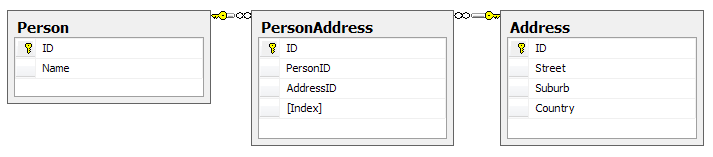
Yes, this may not be the best database design as you could arguably merge PersonAddress and Address, but it’ll do for an example; it’s the query structure we’re more interested in rather than the contents of the tables. One thing to note is that the Index column on PersonAddress is there to number the addresses associated with the person, ie Address 1, Address 2. There cannot be two PersonAddresses for the same person with the same Index. Our entity classes map exactly to these tables.
Let’s say we want to write a query for reporting purposes that flattens this structure out like so:

Optimally, we’d like the LINQ query to write this SQL for us (or at least SQL that performs as well as this; this has a cost of 0.0172):
SELECT p.Name, a1.Street AS 'Street 1', a1.Suburb AS 'Suburb 1', a1.Country AS 'Country 1',
       a2.Street AS 'Street 2', a2.Suburb AS 'Suburb 2', a2.Country AS 'Country 2'
FROM Person p
LEFT OUTER JOIN PersonAddress pa1 on p.ID = pa1.PersonID AND pa1.[Index] = 1
LEFT OUTER JOIN PersonAddress pa2 on p.ID = pa2.PersonID AND pa2.[Index] = 2
LEFT OUTER JOIN [Address] a1 on a1.ID = pa1.AddressID
LEFT OUTER JOIN [Address] a2 on a2.ID = pa2.AddressID
One way of doing this using LINQ, and taking advantage of navigation properties on the entity classes, might be this:
from person in context.People
let firstAddress = person.PersonAddresses.FirstOrDefault(pa => pa.Index == 1).Address
let secondAddress = person.PersonAddresses.FirstOrDefault(pa => pa.Index == 2).Address
select new
{
    Name = person.Name,
    Street1 = firstAddress.Street,
    Suburb1 = firstAddress.Suburb,
    Country1 = firstAddress.Country,

    Street2 = secondAddress.Street,
    Suburb2 = secondAddress.Suburb,
    Country2 = secondAddress.Country,
}
However, using LINQ to SQL, the following SQL is generated (and its cost is 0.0458, which is nearly three times the cost of the SQL we’re aiming for):
SELECT [t0].[Name], (
    SELECT [t3].[Street]
    FROM (
        SELECT TOP (1) [t1].[AddressID] FROM [PersonAddress] AS [t1]
        WHERE ([t1].[Index] = 1) AND ([t1].[PersonID] = [t0].[ID])
        ) AS [t2]
    INNER JOIN [Address] AS [t3] ON [t3].[ID] = [t2].[AddressID]
    ) AS [Street1], (
    SELECT [t6].[Suburb]
    FROM (
        SELECT TOP (1) [t4].[AddressID] FROM [PersonAddress] AS [t4]
        WHERE ([t4].[Index] = 1) AND ([t4].[PersonID] = [t0].[ID])
        ) AS [t5]
    INNER JOIN [Address] AS [t6] ON [t6].[ID] = [t5].[AddressID]
    ) AS [Suburb1], (
    SELECT [t9].[Country]
    FROM (
        SELECT TOP (1) [t7].[AddressID] FROM [PersonAddress] AS [t7]
        WHERE ([t7].[Index] = 1) AND ([t7].[PersonID] = [t0].[ID])
        ) AS [t8]
    INNER JOIN [Address] AS [t9] ON [t9].[ID] = [t8].[AddressID]
    ) AS [Country1], (
    SELECT [t12].[Street]
    FROM (
        SELECT TOP (1) [t10].[AddressID] FROM [PersonAddress] AS [t10]
        WHERE ([t10].[Index] = 2) AND ([t10].[PersonID] = [t0].[ID])
        ) AS [t11]
    INNER JOIN [Address] AS [t12] ON [t12].[ID] = [t11].[AddressID]
    ) AS [Street2], (
    SELECT [t15].[Suburb]
    FROM (
        SELECT TOP (1) [t13].[AddressID] FROM [PersonAddress] AS [t13]
        WHERE ([t13].[Index] = 2) AND ([t13].[PersonID] = [t0].[ID])
        ) AS [t14]
    INNER JOIN [Address] AS [t15] ON [t15].[ID] = [t14].[AddressID]
    ) AS [Suburb2], (
    SELECT [t18].[Country]
    FROM (
        SELECT TOP (1) [t16].[AddressID] FROM [PersonAddress] AS [t16]
        WHERE ([t16].[Index] = 2) AND ([t16].[PersonID] = [t0].[ID])
        ) AS [t17]
    INNER JOIN [Address] AS [t18] ON [t18].[ID] = [t17].[AddressID]
    ) AS [Country2]
FROM [Person] AS [t0]
Hoo boy, that’s horrible SQL! Notice how it’s doing a whole table join for every column? Imagine how that query would scale the more columns you had in your LINQ query! Epic fail.
Entity Framework (v4) fares much better, writing a ugly duckling query that is actually beautiful inside, performing at around the same speed as the target SQL (0.0172):
SELECT [Extent1].[ID] AS [ID], [Extent1].[Name] AS [Name], [Extent3].[Street] AS [Street],
       [Extent3].[Suburb] AS [Suburb], [Extent3].[Country] AS [Country], [Extent5].[Street] AS [Street1],
       [Extent5].[Suburb] AS [Suburb1], [Extent5].[Country] AS [Country1]
FROM [dbo].[Person] AS [Extent1]
OUTER APPLY (
    SELECT TOP (1) [Extent2].[PersonID] AS [PersonID], [Extent2].[AddressID] AS [AddressID],
                   [Extent2].[Index] AS [Index]
    FROM [dbo].[PersonAddress] AS [Extent2]
    WHERE ([Extent1].[ID] = [Extent2].[PersonID]) AND (1 = [Extent2].[Index]) ) AS [Element1]
LEFT OUTER JOIN [dbo].[Address] AS [Extent3] ON [Element1].[AddressID] = [Extent3].[ID]
OUTER APPLY (
    SELECT TOP (1) [Extent4].[PersonID] AS [PersonID], [Extent4].[AddressID] AS [AddressID],
                   [Extent4].[Index] AS [Index]
    FROM [dbo].[PersonAddress] AS [Extent4]
    WHERE ([Extent1].[ID] = [Extent4].[PersonID]) AND (2 = [Extent4].[Index]) ) AS [Element2]
LEFT OUTER JOIN [dbo].[Address] AS [Extent5] ON [Element2].[AddressID] = [Extent5].[ID]
So, if we’re stuck using LINQ to SQL and can’t jump ship to the more mature Entity Framework, how can we manipulate the LINQ to force it to write better SQL? Let’s try putting the Index predicate (ie pa => pa.Index == 1) into the join instead:
from person in context.Persons
join pa in context.PersonAddresses on new { person.ID, Index = 1 } equals new { ID = pa.PersonID, pa.Index } into pa1s
join pa in context.PersonAddresses on new { person.ID, Index = 2 } equals new { ID = pa.PersonID, pa.Index } into pa2s
from pa1 in pa1s.DefaultIfEmpty()
from pa2 in pa2s.DefaultIfEmpty()
let firstAddress = pa1.Address
let secondAddress = pa2.Address
select new
{
    Name = person.Name,
    Street1 = firstAddress.Street,
    Suburb1 = firstAddress.Suburb,
    Country1 = firstAddress.Country,

    Street2 = secondAddress.Street,
    Suburb2 = secondAddress.Suburb,
    Country2 = secondAddress.Country,
}
This causes LINQ to SQL (and Entity Framework) to generate exactly the SQL we were originally aiming for! Notice the use of DefaultIfEmpty to turn the joins into left outer joins (remember that joins in LINQ are inner joins).
At this point you may be thinking “I’ll just use Entity Framework because it seems like I can trust it to write good SQL for me”. Hold your horses my friend; let’s modify the above query just slightly and get rid of those let statements, inlining the navigation through PeopleAddress’s Address property. That’s just navigating through a many to one relation, that shouldn’t cause any problems, right?
from person in context.Persons
join pa in context.PersonAddresses on new { person.ID, Index = 1 } equals new { ID = pa.PersonID, pa.Index } into pa1s
join pa in context.PersonAddresses on new { person.ID, Index = 2 } equals new { ID = pa.PersonID, pa.Index } into pa2s
from pa1 in pa1s.DefaultIfEmpty()
from pa2 in pa2s.DefaultIfEmpty()
select new
{
    Name = person.Name,
    Street1 = pa1.Address.Street,
    Suburb1 = pa1.Address.Suburb,
    Country1 = pa1.Address.Country,

    Street2 = pa2.Address.Street,
    Suburb2 = pa2.Address.Suburb,
    Country2 = pa2.Address.Country,
}
Wrong! Now Entity Framework is doing that retarded table join-per-column thing (the query cost is 0.0312):
SELECT [Extent1].[ID] AS [ID], [Extent1].[Name] AS [Name], [Extent4].[Street] AS [Street],
       [Extent5].[Suburb] AS [Suburb], [Extent6].[Country] AS [Country], [Extent7].[Street] AS [Street1],
       [Extent8].[Suburb] AS [Suburb1], [Extent9].[Country] AS [Country1]
FROM [dbo].[Person] AS [Extent1]
LEFT OUTER JOIN [dbo].[PersonAddress] AS [Extent2] ON ([Extent1].[ID] = [Extent2].[PersonID]) AND (1 = [Extent2].[Index])
LEFT OUTER JOIN [dbo].[PersonAddress] AS [Extent3] ON ([Extent1].[ID] = [Extent3].[PersonID]) AND (2 = [Extent3].[Index])
LEFT OUTER JOIN [dbo].[Address] AS [Extent4] ON [Extent2].[AddressID] = [Extent4].[ID]
LEFT OUTER JOIN [dbo].[Address] AS [Extent5] ON [Extent2].[AddressID] = [Extent5].[ID]
LEFT OUTER JOIN [dbo].[Address] AS [Extent6] ON [Extent2].[AddressID] = [Extent6].[ID]
LEFT OUTER JOIN [dbo].[Address] AS [Extent7] ON [Extent3].[AddressID] = [Extent7].[ID]
LEFT OUTER JOIN [dbo].[Address] AS [Extent8] ON [Extent3].[AddressID] = [Extent8].[ID]
LEFT OUTER JOIN [dbo].[Address] AS [Extent9] ON [Extent3].[AddressID] = [Extent9].[ID]
Incidentally, if you put that query through LINQ to SQL, you’ll find it can deal with the inlined navigation properties and it still generates the correct query (sigh!).
So what’s the lesson here? The lesson is that you must always keep a very close eye on what SQL your LINQ providers are writing for you. A tool like LINQPad may be of some use, as you can write your queries in it and it’ll show you the generated SQL. Although Entity Framework does a better job with SQL generation than LINQ to SQL, as evidenced by it being able to handle our first, more intuitive, LINQ query, it’s still fairly easy to trip it up and get it to write badly performing SQL, so you still must keep your eye on it.
Sweeping Yucky LINQ Queries Under the Rug with Expression Tree Rewriting
May 02, 2011 2:06 PM by Daniel Chambers (last modified on May 03, 2011 6:43 AM)
In my last post, I explained some workarounds that you could hack into your LINQ queries to get them to perform well when using LINQ to SQL and SQL CE 3.5. Although those workarounds do help fix performance issues, they can make your LINQ query code very verbose and noisy. In places where you’d simply call a constructor and pass an entity object in, you now have to use an object initialiser and copy the properties manually. What if there are 10 properties (or more!) on that class? You get a lot of inline code. What if you use it across 10 queries and you later want to add a property to that class? You have to find and change it in 10 places. Did somebody mention code smell?
In order to work around this issue, I’ve whipped up a small amount of code that allows you to centralise these repeated chunks of query code, but unlike the normal (and still recommended, if you don’t have these performance issues) technique of putting the code in a method/constructor, this doesn’t trigger these performance issues. How? Instead of the query calling into an external method to execute your query snippet, my code takes your query snippet and inlines it directly into the LINQ query’s expression tree. (If you’re rusty on expression trees, try reading this post, which deals with some basic expression trees stuff.) I’ve called this code the ExpressionTreeRewriter.
The Rewriter in Action
Let’s set up a little (and very contrived) scenario and then clean up the mess using the rewriter. Imagine we had this entity and this DTO:
public class PersonEntity
{
    public int ID { get; set; }
    public string FirstName { get; set; }
    public string LastName { get; set; }
}

public class PersonDto
{
    public int EntityID { get; set; }
    public string GivenName { get; set; }
    public string Surname { get; set; }
}
Then imagine this nasty query (if it’s not nasty enough for you, add 10 more properties to PersonEntity and PersonDto in your head):
IQueryable<PersonDto> people = from person in context.People
                               select new PersonDto
                               {
                                   EntityID = person.ID,
                                   GivenName = person.FirstName,
                                   Surname = person.LastName,
                               };
Normally, you’d just put those property assignments in a PersonDto constructor that takes a PersonEntity and then call that constructor in the query. Unfortunately, we can’t do that for performance reasons. So how can we centralise those property assignments, but keep our object initialiser? I’m glad you asked!
First, let’s add some stuff to PersonDto:
public class PersonDto
{
    ...

    public static Expression<Func<PersonEntity,PersonDto>> ToPersonDtoExpression
    {
        get
        {
            return person => new PersonDto
            {
                EntityID = person.ID,
                GivenName = person.FirstName,
                Surname = person.LastName,
            };
        }
    }


    [RewriteUsingLambdaProperty(typeof(PersonDto), "ToPersonDtoExpression")]
    public static PersonDto ToPersonDto(PersonEntity person)
    {
        throw new InvalidOperationException("This method is a marker method and must be rewritten out.");
    }
}
Now let’s rewrite the query:
IQueryable<PersonDto> people = (from person in context.People
                                select PersonDto.ToPersonDto(person)).Rewrite();
Okay, admittedly it’s still not as nice as just calling a constructor, but unfortunately our hands are tied in that respect. However, you’ll notice that we’ve centralised that object initialiser snippet into the ToPersonDtoExpression property and somehow we’re using that by calling ToPersonDto in our query.
So how does this all work? The PersonDto.ToPersonDto static method is what I’ve dubbed a “marker method”. As you can see, it does nothing at all, simply throwing an exception to help with debugging. The call to this method is incorporated into the expression tree constructed for the query (stored in IQueryable<T>.Expression). This is what that expression tree looks like:
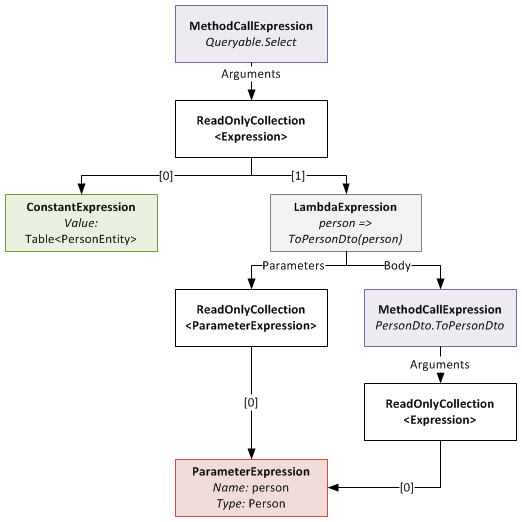
The expression tree before being rewritten
When you call the Rewrite extension method on your IQueryable, it recurs through this expression tree looking for MethodCallExpressions that represent calls to marker methods that it can rewrite. Notice that the ToPersonDto method has the RewriteUsingLambdaPropertyAttribute applied to it? This tells the rewriter that it should replace that method call with an inlined copy of the LambdaExpression returned by the specified static property. Once this is done, the expression tree looks like this:
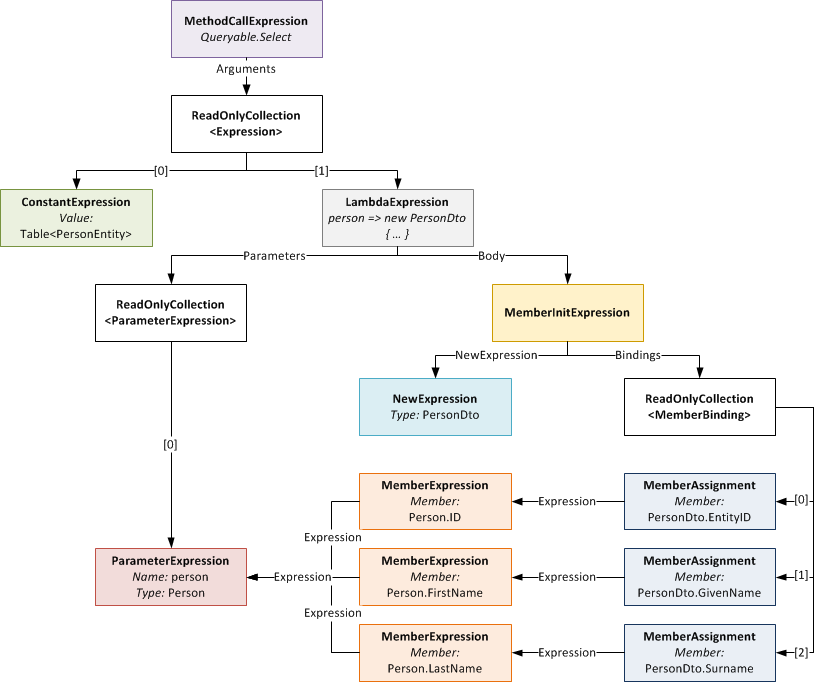
The expression tree after being rewritten (click to enlarge)
Notice that the LambdaExpression’s Body (which used to be the MethodCallExpression of the marker method) has been replaced with the expression tree for the object initialiser.
Something to note: the method signature of marker method and that of the delegate type passed to Expression<T> on your static property must be identical. So if your marker method takes two ClassAs and returns a ClassB, your static property must be of type Expression<Func<ClassA,ClassA,ClassB>> (or some delegate equivalent to the Func<T1,T2,TResult> delegate). If they don’t match, you will get an exception at runtime.
Rewriter Design
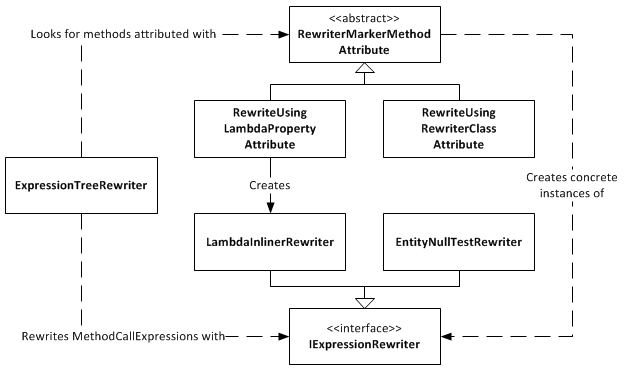
Expression Tree Rewriter Design Diagram
The ExpressionTreeRewriter is the class that implements the .Rewrite() extension method. It searches through the expression tree for called methods that have a RewriterMarkerMethodAttribute on them. RewriterMarkerMethodAttribute is an abstract class, one implementation of which you have already seen. The ExpressionTreeRewriter uses the attribute to create an object implementing IExpressionRewriter which it uses to rewrite the MethodCallExpression it found.
The RewriteUsingLambdaPropertyAttribute creates a LambdaInlinerRewriter properly configured to inline the LambdaExpression returned from your static property. The LambdaInlinerRewriter is called by the ExpressionTreeRewriter to rewrite the marker MethodCallExpression and replace it with the body of the LambdaExpression returned by your static property.
The other marker attribute, RewriteUsingRewriterClassAttribute, allows you to specify a class that implements IExpressionRewriter which will be returned to the rewriter when it wants to rewrite that marker method. Using this attribute gives you low level control over the rewriting as you can create classes that write expression trees by hand.
The EntityNullTestRewriter is one such class. It takes a query with the nasty nullable int performance hack:
IQueryable<IntEntity> queryable = entities.AsQueryable()
    .Where(e => (int?)e.ID != null)
    .Rewrite();
and allows you to sweep that hacky code under the rug, so to speak:
IQueryable<IntEntity> queryable = entities.AsQueryable()
    .Where(e => RewriterMarkers.EntityNullTest(e.ID))
    .Rewrite();
RewriterMarkers.EntityNullTest looks like this:
[RewriteUsingRewriterClass(typeof(EntityNullTestRewriter))]
public static bool EntityNullTest<T>(T entityPrimaryKey)
{
    throw new InvalidOperationException("Should not be executed. Should be rewritten out of the expression tree.");
}
The advantage of EntityNullTest is that people can look at its documentation to see why it’s being used. A person new to the project, or who doesn’t know about the performance hacks, may refactor the int? cast away as it looks like pointless bad code. Using something like EntityNullTest prevents this from happening and also raises awareness of the performance issues.
Give Me The Code!
Enough chatter, you want the code don’t you? The ExpressionTreeRewriter is a part of the DigitallyCreated Utilities BCL library. However, at the time of writing (changeset 4d1274462543), the current release of DigitallyCreated Utilities doesn’t include it, so you’ll need to check out the code from the repository and compile it yourself (easy). The ExpressionTreeRewriter only supports .NET 4, as it uses the ExpressionVisitor class only available in .NET 4; so don’t accidentally use a revision from the .NET 3.5 branch and wonder why the rewriter is not there.
I will get around to making a proper official release of DigitallyCreated Utilities at some point; I’m slowly but surely writing the doco for all the new stuff that I’ve added, and also writing a proper build script that will automate the releases for me and hopefully create NuGet packages too.
Conclusion
The ExpressionTreeRewriter is not something you should just use willy-nilly. If you can get by without it by using constructors and method calls in your LINQ, please do so; your code will be much neater and more understandable. However, if you find yourself in a place like those of us fighting with LINQ to SQL and SQL CE 3.5 performance, a place where you really need to inline lambdas and rewrite your expression trees, please be my guest, download the code, and enjoy.
Working Around Performance Issues in LINQ to SQL and SQL CE 3.5
April 25, 2011 5:17 PM by Daniel Chambers (last modified on May 02, 2011 2:26 PM)
Recently I’ve been optimising LINQ to SQL queries running against an SQL CE 3.5 database in order to stop them taking over 5 minutes to execute and bringing them down to only a few seconds. In this post I’m going to go into two of the biggest offenders I’ve seen so far in terms of killing query performance. Credit must go to my fellow Readifarian Colin Savage with whom I worked to discover and find solutions for the offending LINQ query expressions.
In this post, I’m going to be using the following demonstration LINQ to SQL classes. Note that these are just demo classes and aren’t recommended practice or even fully fleshed out. Note that Game.DeveloperID has an index against it in the database.
[Table(Name = "Developer")]
public class Developer
{
    [Column(DbType = "int NOT NULL IDENTITY", IsPrimaryKey=true, IsDbGenerated=true)]
    public int ID { get; set; }

    [Column(DbType = "nvarchar(50) NOT NULL")]
    public string Name { get; set; }
}

[Table(Name = "Game")]
public class Game
{
    [Column(DbType = "int NOT NULL IDENTITY", IsPrimaryKey=true, IsDbGenerated=true)]
    public int ID { get; set; }

    [Column(DbType = "nvarchar(50) NOT NULL")]
    public string Name { get; set; }

    [Column(DbType = "int NOT NULL")]
    public int DeveloperID { get; set; }

    [Column(DbType = "int NOT NULL")]
    public int Ordinal { get; set; }
}
Outer Joining and Null Testing Entities
The first performance killer Colin and I ran into is where you’re testing whether an outer joined entity is null. Here’s a query that includes the performance killer expression:
var query = from d in context.GetTable<Developer>()
            join g in context.GetTable<Game>()
                on d.ID equals g.DeveloperID into tempG
            from g in tempG.DefaultIfEmpty()
            select new
            {
                d,

                //Inefficient
                Name = g != null ? g.Name : String.Empty,
            };
The above query is doing a left outer join of Game against Developer, and in the case that the developer doesn’t have any games, it’s setting the Name property of the anonymous projection object to String.Empty. Seems like a pretty reasonable query, right?
Wrong. In SQL CE, this is the SQL generated and the query plan created:
SELECT [t0].[ID], [t0].[Name],
(CASE
    WHEN [t2].[test] IS NOT NULL THEN [t2].[Name]
    ELSE CONVERT(NVarChar(50),'')
 END) AS [Name2]
FROM [Developer] AS [t0]
LEFT OUTER JOIN (
    SELECT 1 AS [test], [t1].[Name], [t1].[DeveloperID]
    FROM [Game] AS [t1]
) AS [t2] ON [t0].[ID] = [t2].[DeveloperID]
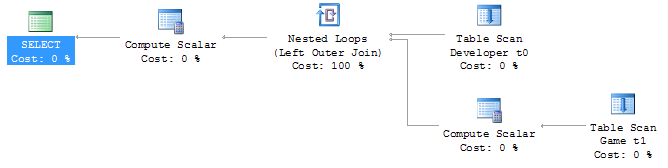
Inefficient join between two table scans on SQL CE 3.5
The problem is that the “SELECT 1 AS [test]” subquery in the SQL is causing SQL CE to do a join between two table scans, which on tables with lots of data is very very slow. Thankfully for those using real SQL Server (I tested on 2008 R2), it seems to be able to deal with this query form and generates an efficient query plan, as shown below.

Efficient join between two clustered index scans on SQL Server 2008 R2
So, what can we do to eliminate that subquery from the SQL? Well, we’re causing that subquery by performing a null test against the entity object in the LINQ expression (LINQ to SQL looks at the [test] column to see if there is a joined entity there; if it’s 1, there is, if it’s NULL, there isn’t). So how about this query instead?
var query = from d in context.GetTable<Developer>()
            join g in context.GetTable<Game>()
               on d.ID equals g.DeveloperID into tempG
            from g in tempG.DefaultIfEmpty()
            select new
            {
                d,

                //Efficient
                Name = g.ID != 0 ? g.Name : String.Empty,
            };
Success! This generates the following SQL and query plan against SQL CE 3.5:
SELECT [t0].[ID], [t0].[Name],
    (CASE
        WHEN [t1].[ID] <> 0 THEN CONVERT(NVarChar(50),[t1].[Name])
        ELSE NULL
     END) AS [Name2]
FROM [Developer] AS [t0]
LEFT OUTER JOIN [Game] AS [t1] ON [t0].[ID] = [t1].[DeveloperID]
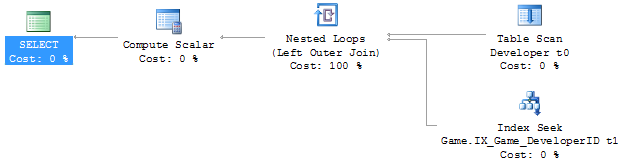
Efficient join between a table scan and an index seek on SQL CE 3.5
The subquery has been removed from the SQL and the query plan reflects this; it now uses an index seek instead of a second table scan in order to do the join. This is much faster!
Okay, that seems like a simple fix. So when we use it like below, putting g.Name into another object, it should keep working correctly, right?
var query = from d in context.GetTable<Developer>()
            join g in context.GetTable<Game>()
                on d.ID equals g.DeveloperID into tempG
            from g in tempG.DefaultIfEmpty()
            select new
            {
                d,

                //Broken
                Name = g.ID != 0 ? new Wrap { Str = g.Name } : null
            };
Unfortunately, no. You may get an InvalidOperationException at runtime (depending on the data in your DB) with the confusing message “The null value cannot be assigned to a member with type System.Boolean which is a non-nullable value type.”
If we look at the SQL generated by this LINQ query and the data returned from the DB, we can see what’s causing this problem:
SELECT [t0].[ID], [t0].[Name],
    (CASE
        WHEN [t1].[ID] <> 0 THEN 1
        WHEN NOT ([t1].[ID] <> 0) THEN 0
        ELSE NULL
     END) AS [value], [t1].[Name] AS [Str]
FROM [Developer] AS [t0]
LEFT OUTER JOIN [Game] AS [t1] ON [t0].[ID] = [t1].[DeveloperID]
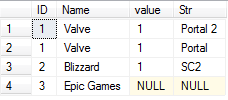
The data returned by the broken query
It’s probably a fair to make the assumption that LINQ to SQL is using the [value] column internally to evaluate the “g.ID != 0” part of the LINQ query, but you’ll notice that in the data the value is NULL for one of the rows. This seems to be what is causing the “can’t assign a null to a bool” error we’re getting. I think this is a bug in LINQ to SQL, because as far as I can tell as this is pretty unintuitive behaviour. Note that this SQL query form, that causes this problem with its CASE, WHEN, WHEN, ELSE expression, is only generated when we project the results into another object, not when we just project the results straight into the main projection object. I don’t know why this is.
So how can we work around this? Prepare to vomit just a little bit, up in the back of your mouth:
var query = from d in context.GetTable<Developer>()
            join g in context.GetTable<Game>()
                on d.ID equals g.DeveloperID into tempG
            from g in tempG.DefaultIfEmpty()
            select new
            {
                d,

                //Fixed! (WTF??)
                Name = (int?)g.ID != null ? new Wrap { Str = g.Name } : null
            };
Mmm, tasty! :S Yes, that C# doesn’t even make sense and a good tool like ReSharper would tell you to remove that pointless int? cast, because ID is already an int and casting it to an int? and checking for null is entirely pointless. But this query form forces LINQ to SQL to generate the SQL we want:
SELECT [t0].[ID], [t0].[Name],
    (CASE
        WHEN ([t1].[ID]) IS NOT NULL THEN 1
        ELSE 0
     END) AS [value], [t1].[Name] AS [Str]
FROM [Developer] AS [t0]
LEFT OUTER JOIN [Game] AS [t1] ON [t0].[ID] = [t1].[DeveloperID]
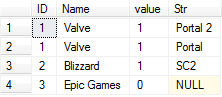
The data returned by the fixed query
Note that the query now returns the expected 0 value instead of NULL in the last row.
Outer Joining and Projecting into an Object Constructor
The other large performance killer Colin and I ran into is where you project into an object constructor. Here’s an example:
var query = from d in context.GetTable<Developer>()
            join g in context.GetTable<Game>()
               on d.ID equals g.DeveloperID into tempG
            from g in tempG.DefaultIfEmpty()
            select new
            {
                d,

                //Inefficient
                Name = (int?)g.ID != null ? new Wrap(g) : null
            };
In the above query we’re passing the whole Game object into Wrap’s constructor, where it’ll copy the Game’s properties to its properties. This makes for neater queries, instead of having a massive object initialiser block where you set all the properties on Wrap with properties from Game. Too bad it reintroduces our little subquery issue back into the SQL:
SELECT [t0].[ID], [t0].[Name],
    (CASE
        WHEN ([t2].[ID]) IS NOT NULL THEN 1
        ELSE 0
     END) AS [value], [t2].[test], [t2].[ID] AS [ID2], [t2].[Name] AS [Name2], [t2].[DeveloperID], [t2].[Ordinal]
FROM [Developer] AS [t0]
LEFT OUTER JOIN (
    SELECT 1 AS [test], [t1].[ID], [t1].[Name], [t1].[DeveloperID], [t1].[Ordinal]
    FROM [Game] AS [t1]
    ) AS [t2] ON [t0].[ID] = [t2].[DeveloperID]
Unfortunately, the only way to get rid of the subquery again is to ditch the constructor and manually initialise the object with an object initialiser, making your queries much longer and noisy when there are a lot of properties:
var query = from d in context.GetTable<Developer>()
            join g in context.GetTable<Game>()
                on d.ID equals g.DeveloperID into tempG
            from g in tempG.DefaultIfEmpty()
            select new
            {
                d,

                //Efficient
                Name = (int?)g.ID != null ? new Wrap { Str = g.Name } : null
            };
This gives us back our efficient (on SQL CE 3.5) SQL:
SELECT [t0].[ID], [t0].[Name],
    (CASE
        WHEN ([t1].[ID]) IS NOT NULL THEN 1
        ELSE 0
     END) AS [value], [t1].[Name] AS [Str]
FROM [Developer] AS [t0]
LEFT OUTER JOIN [Game] AS [t1] ON [t0].[ID] = [t1].[DeveloperID]
Conclusion
For those using LINQ to SQL against real SQL Server, these LINQ contortions are unnecessary to get your performance as real SQL Server is able to make efficient query plans for the form of query that LINQ to SQL creates. However, SQL CE 3.5 can’t deal with these queries and so you need to munge your LINQ queries a bit to get them to perform, which is frustrating. Heading into the future, this won’t be a problem (hopefully) because SQL CE 4 doesn’t support LINQ to SQL and hopefully Entity Framework 4 doesn’t write queries like this (or maybe SQL CE 4 can just deal with it properly). For those on that software stack, it’s probably worth checking out what EF and SQL CE 4 is doing under the covers, as these problems highlight the need for software developers to watch what their LINQ providers are writing for them under the covers to make sure it’s performant.
Edit: For a way to help clean up the verbose hacked up LINQ queries that you end up with when working around these performance problems, check out this post.
More Dynamic Queries using Expression Trees
February 09, 2011 2:42 PM by Daniel Chambers
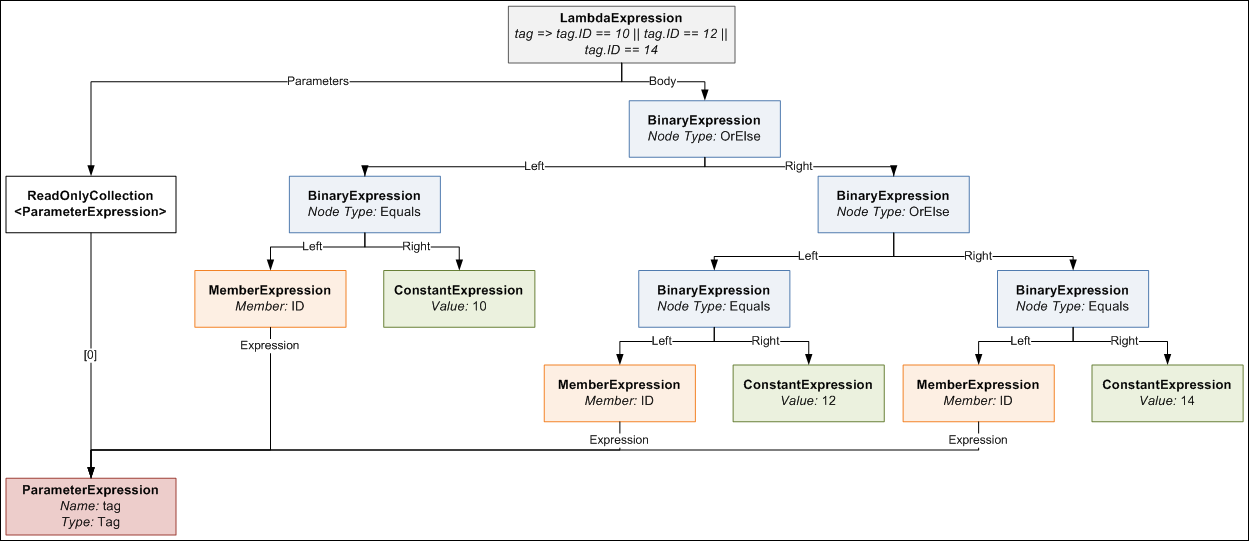
In my first post on dynamic queries using expression trees, I explained how one could construct an expression tree manually that would take an array (for example, {10,12,14}) and turn it into a query like this:
tag => tag.ID == 10 || tag.ID == 12 || tag.ID == 14
A reader recently wrote to me and asked whether one could form a similar query that instead queried across multiple properties, like this:
tag => tag.ID == 10 || tag.ID == 12 || tag.Name == "C#" || tag.Name == "Expression Trees"
The short answer is “yes, you can”, however the long answer is “yes, but it takes a bit of doing”! In this blog post, I’ll detail how to write a utility method that allows you to create these sorts of queries for any number of properties on an object. (If you haven’t read the previous post, please read it now.)
Previously we had defined a method with this signature (I’ve renamed the “convertBetweenTypes” parameter to “memberAccessExpression”; the original name sucked, frankly; this is a clearer name):
public static Expression<Func<TValue, bool>> BuildOrExpressionTree<TValue, TCompareAgainst>(
    IEnumerable<TCompareAgainst> wantedItems,
    Expression<Func<TValue, TCompareAgainst>> memberAccessExpression)
Now that we want to query multiple properties, we’ll need to change this signature to something that allows you to pass multiple wantedItems lists and a memberAccessExpression for each of them.
public static Expression<Func<TValue, bool>> BuildOrExpressionTree<TValue>(
    IEnumerable<Tuple<IEnumerable<object>, LambdaExpression>> wantedItemCollectionsAndMemberAccessExpressions)
Eeek! That’s a pretty massive new single parameter. What we’re now doing is passing in multiple Tuples (if you’re using .NET 3.5, make your own Tuple class), where the first component is the list of wanted items, and the second component is the member access expression. You’ll notice that a lot of the generic types have gone out the window and we’re passing IEnumerables of object and LambdaExpressions around; this is a price we’ll have to pay for having a more flexible method.
How would you call this monster method? Like this:
var wantedItemsAndMemberExprs = new List<Tuple<IEnumerable<object>, LambdaExpression>>
{
    new Tuple<IEnumerable<object>, LambdaExpression>(new object[] {10, 12}, (Expression<Func<Tag, int>>)(t => t.ID)),
    new Tuple<IEnumerable<object>, LambdaExpression>(new[] {"C#", "Expression Trees"}, (Expression<Func<Tag, string>>)(t => t.Name)),
};

Expression<Func<Tag, bool>> whereExpr = BuildOrExpressionTree<Tag>(wantedItemsAndMemberExprs);
Note having to explicitly specify “object[]” for the array of IDs; this is because, although you can now assign IEnumerable<ChildClass> to IEnumerable<ParentClass> (covariance) in C# 4, that only works for reference types. Value types are invariant, so you need to explicitly force int to be boxed as a reference type. Note also having to explicitly cast the member access lambda expressions; this is because the C# compiler won’t generate an expression tree for you unless it knows you explicitly want an Expression<T>; casting forces it to understand that you want an expression tree here and not just some anonymous delegate.
So how is the new BuildOrExpressionTree method implemented? Like this:
public static Expression<Func<TValue, bool>> BuildOrExpressionTree<TValue>(
    IEnumerable<Tuple<IEnumerable<object>, LambdaExpression>> wantedItemCollectionsAndMemberAccessExpressions)
{
    ParameterExpression inputParam = null;
    Expression binaryExpressionTree = null;

    if (wantedItemCollectionsAndMemberAccessExpressions.Any() == false)
        throw new ArgumentException("wantedItemCollectionsAndMemberAccessExpressions may not be empty", "wantedItemCollectionsAndMemberAccessExpressions");

    foreach (Tuple<IEnumerable<object>, LambdaExpression> tuple in wantedItemCollectionsAndMemberAccessExpressions)
    {
        IEnumerable<object> wantedItems = tuple.Item1;
        LambdaExpression memberAccessExpr = tuple.Item2;

        if (inputParam == null)
            inputParam = memberAccessExpr.Parameters[0];
        else
            memberAccessExpr = new ParameterExpressionRewriter(memberAccessExpr.Parameters[0], inputParam).VisitAndConvert(memberAccessExpr, "BuildOrExpressionTree");

        BuildBinaryOrTree(wantedItems, memberAccessExpr.Body, ref binaryExpressionTree);
    }

    return Expression.Lambda<Func<TValue, bool>>(binaryExpressionTree, new[] { inputParam });
}
As I explain this method, you may want to keep an eye on the expression tree diagram from the previous post, so you can visualise the expression tree structure easily. The method loops through each tuple that contains a wantedItems collection and a memberAccessExpression, and progressively builds an expression tree from all the items in all the collections. You’ll notice within the foreach loop that the ParameterExpression from the first memberAccessExpression is kept and used to “rewrite” subsequent memberAccessExpressions. Each memberAccessExpr is a separate expression tree, each with its own ParameterExpression, but since we’re now using multiple of them and combining them all into a single expression tree that still takes a single parameter, we need to ensure that those expressions use a common ParameterExpression. We do this by implementing an ExpressionVisitor that rewrites the expression and replaces the ParameterExpression it uses with the one we want it to use.
public class ParameterExpressionRewriter : ExpressionVisitor
{
    private ParameterExpression _OldExpr;
    private ParameterExpression _NewExpr;

    public ParameterExpressionRewriter(ParameterExpression oldExpr, ParameterExpression newExpr)
    {
        _OldExpr = oldExpr;
        _NewExpr = newExpr;
    }

    protected override Expression VisitParameter(ParameterExpression node)
    {
        if (node == _OldExpr)
            return _NewExpr;
        else
            return base.VisitParameter(node);
    }
}
The ExpressionVisitor uses the visitor pattern, so it recurses through an expression tree and calls different methods on the class depending on what node type it encounters and allows you to rewrite the tree by returning something different from the method. In the VisitParameter method above, we’re simply returning the new ParameterExpression when we encounter the old ParameterExpression in the tree. Note that ExpressionVisitor is new to .NET 4, so if you’re stuck in 3.5-land use this similar implementation instead. (For more information on modifying expression trees, see this MSDN page.)
Going back to the BuildOrExpressionTree method, we see the next thing we do is call the BuildBinaryOrTree method. Note that this method is slightly different to the implementation in the previous post, as I’ve changed it to be a faster iterative algorithm (rather than recursive) and it no longer is generic. The method should look pretty familiar:
private static void BuildBinaryOrTree(
    IEnumerable<object> items,
    Expression memberAccessExpr,
    ref Expression expression)
{
    foreach (object item in items)
    {
        ConstantExpression constant = Expression.Constant(item, item.GetType());
        BinaryExpression comparison = Expression.Equal(memberAccessExpr, constant);

        if (expression == null)
            expression = comparison;
        else
            expression = Expression.OrElse(expression, comparison);
    }
}
As you can see, for each iteration in the main BuildBinaryOrExpressionTree, the existing binary OR tree is fed back into the BuildBinaryOrTree method and extended with more nodes, except each different call uses items from a different collection and a different memberAccessExpression to extend the tree. Once all Tuples have been processed, the binary OR tree is bound together with its ParameterExpression and turned into the LambdaExpression we need for use in an IQueryable Where method. We can use it like this:
Expression<Func<Tag, bool>> whereExpr = BuildOrExpressionTree<Tag>(wantedItemsAndMemberExprs);

IQueryable<Tag> tagQuery = tags.Where(whereExpr);
In conclusion, we see that wanting to query those additional properties required us to add a whole bunch more code in order to make it work. However, in the end, it does work and works quite well, although admittedly the method is a little awkward to use. This could be cleaned up by wrapping it in a “builder”-style class that simplifies the API a little, but I’ll leave that as an exercise to the reader.
Performing Date & Time Arithmetic Queries using Entity Framework v1
June 07, 2010 3:21 PM by Daniel Chambers (last modified on June 09, 2010 2:58 AM)
If one is writing legacy code in .NET 3.5 SP1’s Entity Framework v1 (yes, your brand new code has now been put into the legacy category by .NET 4 :( ), one will find a severe lack of any date & time arithmetic ability. If you look at LINQ to Entities, you will see no date & time arithmetic methods are recognised. And if you look at the canonical functions that Entity SQL provides, you will notice a severe lack of any date & time arithmetic functions. Thankfully, this strangely missing functionality in canonical ESQL has been resolved as of .NET 4; however, that doesn’t help those of us who haven’t yet upgraded to Visual Studio 2010! Thankfully, all is not lost: there is a solution that only sucks a little bit.
Date & time arithmetic is a pretty necessary ability. Imagine the following simplified scenario, where one has a “Contract” entity that defines a business contract that starts at a certain date and lasts for a duration:
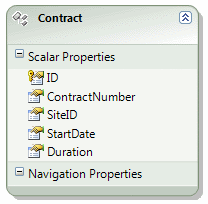
Imagine that you need to perform a query that finds all Contracts that were active on a specific date. You may think of performing a LINQ to Entities query that looks like this:
IQueryable<Contract> contracts =
    from contract in Contracts
    where activeOnDate >= contract.StartDate &&
          activeOnDate < contract.StartDate.AddMonths(contract.Duration)
    select contract
However, this is not supported by LINQ to Entities and you’ll get a NotSupportedException. With canonical ESQL missing any defined date & time arithmetic functions, it seems we are left without a recourse.
However, if one digs around in MSDN, one may stumble across the fact that the SQL Server Entity Framework provider defines some provider-specific ESQL functions with which one can use to do date & time arithmetic. So we can write an ESQL query to get the functionality we wish:
const string eSqlQuery = @"SELECT VALUE c FROM Contracts AS c
                           WHERE @activeOnDate >= c.StartDate
                           AND @activeOnDate < SqlServer.DATEADD('months', c.Duration, c.StartDate)";

ObjectQuery<Contract> contracts =
    context.CreateQuery<Contract>(eSqlQuery, new ObjectParameter("activeOnDate", activeOnDate));
Note the use of the SqlServer.DATEADD ESQL function. The “SqlServer” bit is specifying the SQL Server provider’s specific namespace. Obviously this approach has some disadvantages: it’s not as nice as using LINQ to Entities, and it’s also not database provider agnostic (so if you’re using Oracle you’ll need to see whether your Oracle provider has something like this). However, the alternatives are either to write SQL manually (negating the usefulness of Entity Framework) or to download all the entities into local memory and use LINQ to Objects (almost never, ever an acceptable option!).
Notice that using the CreateQuery function to create the query from ESQL returned an ObjectQuery<T> (which implements IQueryable<T>)? This means that you can now use LINQ to Entities to change that query. For example, what if we wanted to perform some further filtering that can be customised by the user (the user’s filtering preferences are set in the ContractFilterSettings class in the below example):
private ObjectQuery<Contract> CreateFilterSettingsAsQueryable(ContractFilterSettings filterSettings, MyEntitiesContext context)
{
    IQueryable<Contract> query = context.Contracts;

    if (filterSettings.ActiveOnDate != null)
    {
        const string eSqlQuery = @"SELECT VALUE c FROM Contracts AS c
                                   WHERE @activeOnDate >= c.StartDate
                                   AND @activeOnDate < SqlServer.DATEADD('months', c.Duration, c.StartDate)";
        query = context.CreateQuery<Contract>(eSqlQuery, new ObjectParameter("activeOnDate", filterSettings.ActiveOnDate));
    }
    if (filterSettings.SiteId != null)
        query = query.Where(c => c.SiteID == filterSettings.SiteId);
    if (filterSettings.ContractNumber != null)
        query = query.Where(c => c.ContractNumber == filterSettings.ContractNumber);

    return (ObjectQuery<Contract>)query;
}
Being able to continue to use LINQ to Entities after creating the initial query in ESQL means that you can have the best of both worlds (forgetting the fact that we ought to be able to do date & time arithmetic in LINQ to Entities in the first place!). Note that although you can start a query in ESQL and then add to it with LINQ to Entities, you cannot start a query in LINQ to Entities and add to it with ESQL, hence why the ActiveOnDate filter setting was done first.
For those who use .NET 4, unfortunately you’re still stuck with being unable to do date & time arithmetic with LINQ to Entities by default (Alex James told me on Twitter a while back that this was purely because of time constraints, not because they are evil or something :) ). However, you get canonical ESQL functions that are provider independent (so instead of using SqlServer.DATEADD above, you’d use AddMonths). If you really want to use LINQ to Entities (which is not surprising at all), you can create ESQL snippets in your model (“Model Defined Functions”) and then create annotated method stubs which Entity Framework will recognise when you use them inside a LINQ to Entities query expression tree. For more information see this post on the Entity Framework Design blog, and this MSDN article.
EDIT: Diego Vega kindly pointed out to me on Twitter that, in fact, Entity Framework 4 comes with some methods you can mix into your LINQ to Entities queries to call on EF v4’s new canonical date & time ESQL functions. Those methods (as well as a bunch of others) can be found in the EntityFunctions class as static methods. Thanks Diego!
DigitallyCreated Utilities v1.0.0 Released
March 24, 2010 2:43 PM by Daniel Chambers (last modified on June 07, 2010 3:35 PM)
After a hell of a lot of work, I am happy to announce that the 1.0.0 version of DigitallyCreated Utilities has been released! DigitallyCreated Utilities is a collection of many neat reusable utilities for lots of different .NET technologies that I’ve developed over time and personally use on this website, as well as on others I have a hand in developing. It’s a fully open source project, licenced under the Ms-PL licence, which means you can pretty much use it wherever you want and do whatever you want to it. No viral licences here.
The main reason that it has taken me so long to release this version is because I’ve been working hard to get all the wiki documentation on CodePlex up to scratch. After all, two of the project values are:
- To provide fully XML-documented source code
- To back up the source code documentation with useful tutorial articles that help developers use this project
And truly, nothing is more frustrating than code with bad documentation. To me, bad documentation is the lack of a unifying tutorial that shows the functionality in action, and the lack of decent XML documentation on the code. Sorry, XMLdoc that’s autogenerated by tools like GhostDoc, and never added to by the author, just doesn’t cut it. If you can auto-generate the documentation from the method and parameter names, it’s obviously not providing any extra value above and beyond what was already there without it!
So what does DCU v1.0.0 bring to the table? A hell of a lot actually, though you may not need all of it for every project. Here’s the feature list grouped by broad technology area:
- ASP.NET MVC and LINQ
- Sorting and paging of data in a table made easy by HtmlHelpers and LINQ extensions (see tutorial)
- ASP.NET MVC
- HtmlHelpers
- TempInfoBox - A temporary "action performed" box that displays to the user for 5 seconds then fades out (see tutorial)
- CollapsibleFieldset - A fieldset that collapses and expands when you click the legend (see tutorial)
- Gravatar - Renders an img tag for a Gravatar (see tutorial)
- CheckboxStandard & BoolBinder - Renders a normal checkbox without MVC's normal hidden field (see tutorial)
- EncodeAndInsertBrsAndLinks - Great for the display of user input, this will insert <br/>s for newlines and <a> tags for URLs and escape all HTML (see tutorial)
- IncomingRequestRouteConstraint - Great for supporting old permalink URLs using ASP.NET routing (see tutorial)
- Improved JsonResult - Replaces ASP.NET MVC's JsonResult with one that lets you specify JavaScriptConverters (see tutorial)
- Permanently Redirect ActionResults - Redirect users with 301 (Moved Permanently) HTTP status codes (see tutorial)
- Miscellaneous Route Helpers - For example, RouteToCurrentPage (see tutorial)
- HtmlHelpers
- LINQ
- MatchUp & Federator LINQ methods - Great for doing diffs on sequences (see tutorial)
- Entity Framework
- CompiledQueryReplicator - Manage your compiled queries such that you don't accidentally bake in the wrong MergeOption and create a difficult to discover bug (see tutorial)
- Miscellaneous Entity Framework Utilities - For example, ClearNonScalarProperties and Setting Entity Properties to Modified State (see tutorial)
- Error Reporting
- Easily wire up some simple classes and have your application email you detailed exception and error object dumps (see tutorial)
- Concurrent Programming
- Unity & WCF
- WCF Client Injection Extension - Easily use dependency injection to transparently inject WCF clients using Unity (see tutorial)
- Miscellaneous Base Class Library Utilities
- SafeUsingBlock and DisposableWrapper - Work with IDisposables in an easier fashion and avoid the bug where using blocks can silently swallow exceptions (see tutorial)
- Time Utilities - For example, TimeSpan To Ago String, TzId -> Windows TimeZoneInfo (see tutorial)
- Miscellaneous Utilities - Collection Add/RemoveAll, Base64StreamReader, AggregateException (see tutorial)
DCU is split across six different assemblies so that developers can pick and choose the stuff they want and not take unnecessary dependencies if they don’t have to. This means if you don’t use Unity in your application, you don’t need to take a dependency on Unity just to use the Error Reporting functionality.
I’m really pleased about this release as it’s the culmination of rather a lot of work on my part that I think will help other developers write their applications more easily. I’m already using it here on DigitallyCreated in many many places; for example the Error Reporting code tells me when this site crashes (and has been invaluable so far), the CompiledQueryReplicator helps me use compiled queries effectively on the back-end, and the ReaderWriterLock is used behind the scenes for the Twitter feed on the front page.
I hope you enjoy this release and find some use for it in your work or play activities. You can download it here.
ASP.NET MVC Model Binders + RegExs + LINQ == Awesome
December 10, 2009 2:00 PM by Daniel Chambers
I was working on some ASP.NET MVC code today and I created this neat little solution that uses a custom model binder to automatically read in a bunch of dynamically created form fields and project their data into a set of business entities which were returned by the model binder as a parameter to an action method. The model binder isn't particularly complex, but the way I used regular expressions and LINQ to identify and collate the fields I needed to create the list of entities from was really neat and cool.
I wrote a Javascript-powered form (using jQuery) that allowed the user to add and edit multiple items at the same time, and then submit the set of items in a batch to the server for a save. The entity these items represented looks like this (simplified):
public class CostRangeItem
{
    public short VolumeUpperBound { get; set; }
    public decimal Cost { get; set; }
}
The Javascript code, which I won't go into here as it's not particularly cool (just a bit of jQuery magic), creates form items that look like this:
<input id="VolumeUpperBound:0" name="VolumeUpperBound:0" type="text />
<input id="Cost:0" name="Cost:0" type="text" />
The multiple items are handled by adding more form fields and incrementing the number after the ":" in the id/name. So having fields for two items means you end up with this:
<input id="VolumeUpperBound:0" name="VolumeUpperBound:0" type="text />
<input id="Cost:0" name="Cost:0" type="text" />
<input id="VolumeUpperBound:1" name="VolumeUpperBound:1" type="text />
<input id="Cost:1" name="Cost:1" type="text" />
I chose to use the weird ":n" format instead of a more obvious "[n]" format (like arrays) since using "[" is not valid in an ID attribute and you end up with a page that doesn't validate.
I created a model binder class that looked like this:
private class CostRangeItemBinder : IModelBinder
{
    public object BindModel(ControllerContext controllerContext, ModelBindingContext bindingContext)
    {
        ...
    }
}
To use the model binder on an action method, you use the ModelBinderAttribute to specify the type of model binder you want ASP.NET MVC to bind the parameter with:
public ActionResult Create([ModelBinder(typeof(CostRangeItemBinder))] IList<CostRangeItem> costRangeItems)
{
    ...
}
The first thing I did was create two regular expressions so that I could identify which fields I needed to read in (the VolumeUpperBound ones and the Cost ones). I chose to use regular expressions because they're much simpler to write (once you learn them!) than some manual string hacking code, and I could use them to not only identify which fields I needed to read, but also to extract the number after the ":" so I could link up the appropriate VolumeUpperBound field with the appropriate Cost field to create a CostRangeItem object. These are the regular expressions I used:
private static readonly Regex _VolumeUpperBoundRegex = new Regex(@"^VolumeUpperBound:(\d+)$");

private static readonly Regex _CostRegex = new Regex(@"^Cost:(\d+)$");
Both regexs work like this: the ^ at the beginning and the $ at the end means that, in the matching string, there cannot be any characters before or after the characters specified in between those symbols. It effectively anchors the match to the beginning and the end of the string. Inside those symbols, each regex matches their field name and the ":" character. They then define a special "group" using the ()s. Using the group allows me to pull out the sub-part of the regex match defined by this group later on. The \d+ means match one or more digits (0-9), which matches the number after the ":".
Note that I've made the Regex objects static readonly members of my binder class. Keeping a single instance of the regex object, which is immutable, saves .NET from having to recompile a new Regex every time I bind, which I believe is a relatively expensive process.
Then, in the BindModel method, I first make sure that the model binder has been used on the correct type in the action method:
if (bindingContext.ModelType.IsAssignableFrom(typeof(List<CostRangeItem>)) == false)
    return null;
I then use LINQ to perform matches against all the fields in the current page submit (via the BindingContext's ValueProvider IDictionary). I do this using a Select() call, which performs the match and puts the results into an anonymous class. I then filter out any fields that didn't match the regex using a Where() call.
var vubMatches = bindingContext.ValueProvider
                    .Select(kvp => new
                        {
                            Match = _VolumeUpperBoundRegex.Match(kvp.Key),
                            Value = kvp.Value.AttemptedValue
                        })
                    .Where(o => o.Match.Success);

var costMatches = bindingContext.ValueProvider
                    .Select(kvp => new
                        {
                            Match = _CostRegex.Match(kvp.Key),
                            Value = kvp.Value.AttemptedValue
                        })
                    .Where(o => o.Match.Success);
Now I need to link up VolumeUpperBound fields with their associated Cost fields. To do this, I do an inner equijoin using LINQ. I join on the result of that regex group that I created that extracts the number from the field name. This means I join VolumeUpperBound:0 with Cost:0, and VolumeUpperBound:1 with Cost:1 and so on.
List<CostRangeItem> costRangeItems =
        (from vubMatch in vubMatches
         join costMatch in costMatches
           on vubMatch.Match.Groups[1].Value equals costMatch.Match.Groups[1].Value
         where ValuesAreValid(vubMatch.Value, costMatch.Value, controllerContext)
         select new CostRangeItem
                   {
                       Cost = Decimal.Parse(costMatch.Value),
                       VolumeUpperBound = Int16.Parse(vubMatch.Value)
                   }
        ).ToList();

return costRangeItems;
I then use a where clause to ensure the values submitted are actually of the correct type, since the Value member is actually a string at this point (I pass them into a ValuesAreValid method, which returns a bool). This method marks the ModelState with an error if it finds a problem. I then use Select to create a CostRangeItem per join and copy in the values from the form fields using an object initialiser. I can then finally return my List of CostRangeItem. The ASP.NET MVC framework ensures that this result is passed to the action method that declared that it wanted to use this model binder.
As you can see, the solution ended up being a neat declarative way of writing a model binder that can pull in and bind multiple objects from a dynamically created form. I didn't have to do any heavy lifting at all; regular expressions and LINQ handled all the munging of the data for me! Super cool stuff.
Dynamic Queries in Entity Framework using Expression Trees
June 06, 2009 2:00 PM by Daniel Chambers (last modified on January 13, 2011 12:24 PM)
Most of the queries you do in your application are probably static queries. The parameters you set on the query probably change, but the actual query itself doesn't. That's why compiled queries are so cool, because you can pre-compile and reuse a query over and over again and just vary the parameters (see my last blog for more information).
But sometimes you might need to construct a query at runtime. By this I mean not just changing the parameter values, but actually changing the query structure. A good example of this would be a filter, where, depending on what the user wants, you dynamically create a query that culls a set down to what the user is looking for. If you've only got a couple of filter options, you can probably get away with writing multiple compiled queries to cover the permutations, but it only takes a few filter options before you've got a lot of permutations and it becomes unmanageable.
A good example of this is file searching. You can filter a list of files by name, type, size, date modified, etc. The user may only want to filter by one of these filters, for example with "Awesome" as the filename. But the user may also want to filter by multiple filters, for example, "Awesome" as the filename, but modified after 2009/07/07 and more than 20MB in size. To create a static query for each permutation would result in 16 queries (4 squared)!
My first foray into creating dynamic queries is a bit less ambitious than the above example, however. I have a scenario where I need to pull out a number of Tag objects from the database by their IDs. However, the number of the Tag objects needed is determined by the user. They may select 3 Tags, or they may select 6 Tags, or they may select 4 tags; it's up to them.
The most boring approach is, of course, to get each Tag out of the database individually with its own query (the "get each Tag individually" approach):
IList<Tag> list = new List<Tag>();
foreach (int tagId in WantedTagIds)
{
    int localTagId = tagId;

    Tag theTag = (from tag in context.Tag
                  where
                    tag.Account.ID == AccountId &&
                    tag.ID == localTagId
                  select tag).First();

    list.Add(theTag);
}
You could compile that query to make it run faster, but it's still a slow operation. If the user wants to get 6 Tags, you need to query the database 6 times. Not very cool.
This is where dynamic queries can step in. If the user asks for 3 Tags, you can generate a where clause that gets all three Tags in one go; essentially: tag.ID == 10 || tag.ID == 12 || tag.ID == 14. That way you get all three Tags in one query to the database. So, I wrote some generic type-safe code to perform exactly that: generating a where clause expression from a list of IDs so that a Tag with any of those IDs is retrieved.
To understand how I did this, you need to understand how the where clause in an LINQ expression works. It is easiest to understand if you look at the method-chain form of LINQ rather than the special C# syntax. It looks like this:
IQueryable<Tag> tags = context.Tag.AsQueryable()
                                  .Where(tag => tag.ID == 10);
The Where method takes a parameter that looks like this: Expression<Func<Tag, bool>>. Notice how the Func delegate is wrapped in an Expression? This means that instead of creating an actual anonymous method for the Func delegate, the compiler will instead convert your lambda expression into an Expression Tree.
An Expression Tree is a representation of your expression in an object tree. Here is an object tree that shows the main objects in the expression tree generated by the compiler for the lambda expression in the above example's Where method:
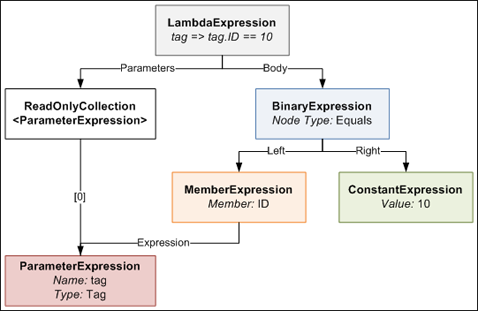
The LambdaExpression has a collection of ParameterExpressions, which are the parameters on the left side of the => symbol in the code. The actual Body of the lambda is made up of a BinaryExpression of type Equals, whose Right side is a ConstantExpression that contains the value of 10, and whose Left side is a MemberExpression. A MemberExpression represents the access of the ID property on the tag parameter.
So if we wanted to represent a more complex expression such as:
tag => tag.ID == 10 || tag.ID == 12 || tag.ID == 14
this is what the expression tree would look like. It looks a bit daunting, but computers are very good at trees, so writing code to generate such a tree is not too difficult with the help of a little recursion.

I defined a special utility method that allows you to create an expression tree like the one above that results in a Where expression that accepts a particular tag so long as its ID is in a certain set of IDs. The method is generic and reusable across anywhere where you need a Where filter that gets "this value, or this value, or this value... etc". The public method looks like this:
public static Expression<Func<TValue, bool>> BuildOrExpressionTree<TValue, TCompareAgainst>(
        IEnumerable<TCompareAgainst> wantedItems,
        Expression<Func<TValue, TCompareAgainst>> convertBetweenTypes)
{
    ParameterExpression inputParam = convertBetweenTypes.Parameters[0];

    Expression binaryExpressionTree = BuildBinaryOrTree(wantedItems.GetEnumerator(), convertBetweenTypes.Body, null);

    return Expression.Lambda<Func<TValue, bool>>(binaryExpressionTree, new[] { inputParam });
}
It's stuffed full of generics which makes it look more complicated than it really is. Here's how you call it:
List<int> ids = new List<int> { 10, 12, 14 };
Expression<Func<Tag, bool>> whereClause = BuildOrExpressionTree<Tag, int>(wantedTagIds, tag => tag.ID);
As I explain how it works, I suggest you keep an eye on the last expression tree diagram. The method defines two generic types, one called TValue which represents the value you are comparing, in this case the Tag class. The other generic type is called TCompareAgainst and is the type of the value you are comparing against, in this case int (because the Tag.ID property is an int).
You pass the method an IEnumerable<TCompareAgainst>, which in our case is an IEnumerable<int>, because we have a list of IDs we are comparing against.
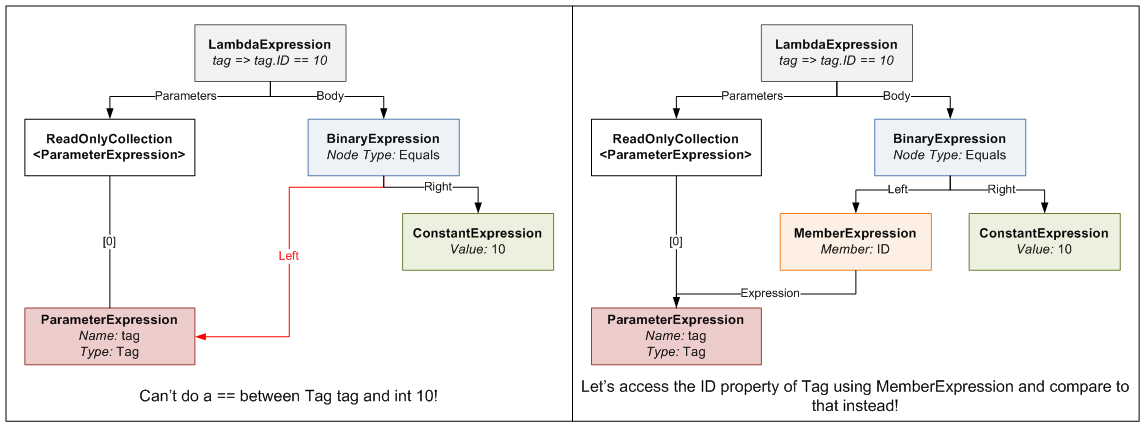
The second parameter ("convertBetweenTypes") can be a bit confusing; let me explain. The expression we are defining for the Where clause takes a Tag and returns a bool (hence the Func<Tag, bool> typed expression). Since the set of values we are comparing against are ints, we can't just do an == between the Tag and an int. To be able to do this comparison, we need to somehow "convert" the Tag we receive into an int for comparison. This is where the second parameter comes in. It defines an Expression that takes a Tag and returns an int (or in generic terms takes a TValue and returns a TCompareAgainst). When you write tag => tag.ID, the compiler generates an Expression Tree that contains a MemberExpression that accesses ID on the tag ParameterExpression. This means wherever we need to do a Tag == int, we instead do a Tag.ID == int by substituting the Tag.ID MemberExpression generated in the place of the Tag. Here's a diagram that explains what I'm ranting about.
The main purpose of this method is to create the final LambdaExpression that the method returns. It does this by attaching the expression tree built by the BuildBinaryOrTree method (we'll get into this in a second) and the ParameterExpression from the convertBetweenTypes to the final LambdaExpression object.
The BuildBinaryOrTree method looks like this:
private static Expression BuildBinaryOrTree<T>(
    IEnumerator<T> itemEnumerator,
    Expression expressionToCompareTo,
    Expression expression)
{
    if (itemEnumerator.MoveNext() == false)
        return expression;

    ConstantExpression constant = Expression.Constant(itemEnumerator.Current, typeof(T));
    BinaryExpression comparison = Expression.Equal(expressionToCompareTo, constant);

    BinaryExpression newExpression;

    if (expression == null)
        newExpression = comparison;
    else
        newExpression = Expression.OrElse(expression, comparison);

    return BuildBinaryOrTree(itemEnumerator, expressionToCompareTo, newExpression);
}
It takes an IEnumerator that enumerates over the wantedItems list (from the BuildOrExpressionTree method), an expression to compare each of these wanted items to (which is the compiler-generated MemberExpression from BuildOrExpressionTreeMethod), and an expression from a previous recursion (starts off as null).
The method creates an Equals BinaryExpression that compares the expressionToCompareTo and the current itemEnumerator value. It then joins this in an OrElse BinaryExpression comparison with the expression from previous recursions. It then takes this new expression and passes it down to the next recursive call. This process continues until itemEnumerator is exhausted at which point the final expression tree is returned.
Once this returned expression tree is placed in its LambdaExpression by the BuildOrExpressionTree method, you end up with a pretty expression tree like this one shown previously. We can then use this expression tree in the where clause of a LINQ method chain query.
Here's the final "generated where clause" query in action:
using (DHEntities context = new DHEntities())
{
    int[] wantedTagIds = new[] {12, 24, 1, 4, 32, 19};

    Expression<Func<Tag, bool>> whereClause = ExpressionTreeUtil.BuildOrExpressionTree<Tag, int>(wantedTagIds, tag => tag.ID);

    IQueryable<Tag> tags = context.Tag.Where(whereClause);

    IList<Tag> list = tags.ToList();
}
So how much better is this approach, which is decidedly more complex than the simple "get each Tag at a time" approach? Is it worth the effort? I performed some benchmarks similar to the ones I did in the last blog to find out.
In one benchmark run, I ran these queries, each a hundred times, each getting out the same 6 tags:
- The "get each Tag individually" query (uncompiled)
- The "get each Tag individually" query (compiled)
- The "generated where clause" query. The where clause was regenerated each time.
I then ran the benchmark 100 times so that I could get more reliable averaged values. These are the results I got:
| Average | Standard Deviation | |
|---|---|---|
| "Get Each Tag Individually" Query Loop (Uncompiled) | 3212.2ms | 40.2ms |
| "Get Each Tag Individually" Query Loop (Compiled) | 1349.3ms | 24.2ms |
| "Generated Where Clause" Query Loop | 197.8ms | 5.3ms |
As you can see, the Generated Where Clause approach is quite a lot faster than the individual queries. We can see compiling the Individual query helps, but not enough to beat the Generated Where Clause query, which is faster even though it is recompiled each time! (You can't precompile a dynamic query, obviously). The Generated Where Clause query is 6.8 times faster than the compiled Individual query and a whopping 16.2 times faster than the uncompiled Individual query.
Even though dynamic queries are lots harder than normal static queries, because you have to manually mess with Expression Trees, there are large payoffs to be had in doing so. When used in the appropriate place, dynamic queries are faster than static queries. They could also potentially make your code cleaner, especially in the case of the filter example I talked about at the beginning of this blog. So consider getting up to speed with Expression Trees. It's worth the effort.
Making Entity Framework as Quick as a Fox
June 04, 2009 2:00 PM by Daniel Chambers
Entity Framework is the new (as of .NET 3.5 SP1) ORM technology for the .NET Framework. ORM technologies are widely accepted as the "better" way of accessing relational databases, because they allow you to work with relational data as objects in the world of objects. However, ORM tech can be slower than writing manual SQL queries yourself. This can be seen in this blog that benchmarks Entity Framework versus LINQ to SQL and a manual SQLDataReader.
Hardware is cheap (compared to programmer labour, which is not) so getting a faster machine could be an effective strategy to counter performance issues with ORM. However, what if we could squeeze some extra performance out of Entity Framework with only a little effort?
This is where Compiled Queries come in. Compiled queries are good to use where you have one particular query that you use over and over again in the same application. A normal query (using LINQ) is passed to Entity Framework as an expression tree. Entity Framework translates it into a command tree that is then translated by a database-specific provider into a query against a database. It does this every time you execute the query. Obviously, if this query is in a loop (or is called often) this is suboptimal because the query is recompiled every time, even though all that's probably changed is the parameters in the query. Compiled queries ensure that the query is only compiled once, and the only thing that varies is the parameters.
I created a quick benchmark app to find out just how much faster compiled queries are against normal queries. I'll illustrate how the benchmark works and then present the results.
Basically, I had a particular non-compiled LINQ to Entities query which I ran 100 times in a loop and timed how long it took. I then created the same query, but as a compiled query instead. I ran it once, because the query is compiled the first time you run it, not when you construct it. I then ran it 100 times in a loop and timed how long it took. Also, before doing any of the above, I ran the non-compiled query once, because it seemed to take a long time for the very first operation using the Entity Framework to run, so I wanted that time excluded from my results.
The non-compiled query I ran looked like this:
IQueryable<Transaction> transactions =
                from transaction in context.Transaction
                where
                  transaction.TransactionDate >= FromDate &&
                  transaction.TransactionDate <= ToDate
                select transaction;

List<Transaction> list = transactions.ToList();
As you can see, it's nothing fancy, just a simple query with a small where clause. This query returns 39 Transaction objects from my database (SQL Server 2005).
The compiled query was created like this:
Func<DHEntities, DateTime, DateTime, IQueryable<Transaction>>
    query;

query = CompiledQuery.Compile(
            (DHEntities ctx, DateTime fromD, DateTime toD) =>
                from transaction in ctx.Transaction
                where
                  transaction.TransactionDate >= fromD &&
                  transaction.TransactionDate <= toD
                select transaction);
As you can see, to create a compiled query you pass your LINQ query to CompiledQuery.Compile() via a lambda expression that defines the things that the query needs (ie the Object Context (in this case, DHEntities) and the parameters used (in this case two DateTimes). The Compile function will return a Func delegate that has the types you defined in your lambda, plus one extra: the return type of the query (in this case IQueryable<Transaction>).
The compiled query was executed like this:
IQueryable<Transaction> transactions = query.Invoke(context, FromDate, ToDate);

List<Transaction> list = transactions.ToList();
I ran the benchmark 100 times, collected all the data and then averaged the results:
| Average | Standard Deviation | |
|---|---|---|
| Non-compiled Query Loop | 534.1ms | 20.6ms |
| Compiled Query Loop | 63.1ms | 0.6ms |
The results are impressive. In this case, compiled queries are 8.5 times faster than normal queries! I've showed the standard deviation so that you can see that the results didn't fluctuate much between each benchmark run.
The use case I have for using compiled queries is doing database access in a WCF service. I expose a service that will likely be beaten to death by constant queries from an ASP.NET MVC webserver. Sure, I could get larger hardware to make the WCF service go faster, or I could simply get a rather massive performance boost just by using compiled queries.
Sexy C# Filter Code for RealDWG Database Navigation
May 31, 2009 2:00 PM by Daniel Chambers
I've been having to use RealDWG for my part time programming work at Onset to programmatically read DWG files (AutoCAD drawing files). I've been finding RealDWG a pain to learn, as AutoDesk's documentation seems to assume you're an in-house AutoCAD programmer, so they blast you with all these low level file access details like BlockTables and SymbolTables. However, this isn't surprising, since I believe AutoDesk eat their own dog food and use the same API internally. That doesn't make it any easier to learn and use, though.
RealDWG (or ObjectARX, which is the underlying API that is wrapped with .NET wrapper classes) reads a DWG file into an internal "database". Everything is basically an ObjectId, which is a short stub object that you give to a Transaction object that will get you the actual real object. Objects are nested inside objects, which are nested inside more objects, and none of it typesafe, as Transaction returns objects as their top level DBObject class. So you're constantly casting to the actual concrete type you want. Casting all over the place == bad.
Anyway, I found that navigating around a RealDWG object graph was a pain. For example, to find BlockTableRecords (which are inside a BlockTable) that contain AttributeDefinitions (don't worry about what those are; it's not important) you need to do something like this:
BlockTable blockTable = (BlockTable)transaction.GetObject(db.BlockTableId, OpenMode.ForRead);

foreach (ObjectId objectId in blockTable)
{
    DBObject dbObject = transaction.GetObject(objectId, OpenMode.ForRead);

    BlockTableRecord record = (BlockTableRecord)dbObject;

    if (record.HasAttributeDefinitions == false)
        continue;

    //Do what you need to here...
}
That's really verbose and messy, with a lot of code just dedicated to opening objects and casting them, and filtering. It was annoying me, so I refactored it and wrote the following sexy method that uses generics with delegates to clean that right up:
private IEnumerable<T> Filter<T>(Predicate<T> predicate, IEnumerable realDwgEnumerable, Transaction transaction)
    where T : class
{
    foreach (ObjectId obj in realDwgEnumerable)
    {
        DBObject dbObject = transaction.GetObject(obj, OpenMode.ForRead);

        T genericObj = dbObject as T;
        if (genericObj == null)
            continue;

        if (predicate != null && predicate(genericObj) == false)
            continue;

        yield return genericObj;
    }
}
The method is generic and takes an IEnumerable (which is the non-generic interface that all the RealDWG stuff that you can iterate over implements) and a Transaction (to open objects from ObjectId stubs with). Additionally, it takes a Predicate<T> that allows you to specify a condition on which concrete objects are included in the final set. It returns an IEnumerable of the generic type T.
What the method will do is iterate over the IEnumerable and pull out all the objects that match the generic type that you define when you call the method. Additionally, it will return only those objects that match your predicate. The method uses the yield return keywords to lazy return results as the returned IEnumerable is iterated over.
Here's the above messy example all sexed up by using this method:
BlockTable blockTable = (BlockTable)transaction.GetObject(db.BlockTableId, OpenMode.ForRead);

IEnumerable<BlockTableRecord> blockTableRecords = Filter<BlockTableRecord>(btr => btr.HasAttributeDefinitions, blockTable, transaction);

foreach (BlockTableRecord blockTableRecord in blockTableRecords)
{
    //Do what you need to here...
}
Just like using LINQ, the above snippet (which looks longer than it really is thanks to wrapping) simply declares that it wants all BlockTableRecords in the BlockTable that have attribute definitions (using a lambda expression). It's much neater, if only because it shifts the filtering code out of the way into the Filter method, so that it doesn't clutter up what I'm trying to do. It also makes the foreach type-safe, because now we're iterating over an IEnumerable<T> rather than a non-generic IEnumerable. Worst case: the IEnumerable<T> is empty. No InvalidCastExceptions here.
Another place where this method is awesome is when you've got lots of different typed objects getting returned as you iterate over the RealDWG IEnumerable object, which happens a lot. Using this method you can very simply get the type of object you're looking for by doing this:
IEnumerable<TypeIWant> objectsIWant = Filter<TypeIWant>(null, blockTableRecord, transaction);
Optimally you use the overload that doesn't include the Predicate<T> as a parameter, instead of passing null as the predicate (the overload passes null for you). I didn't show that here, but it's in my code.
Wrapping up, this again confirms how much I love C# 3.0 (and soon 4.0!). All the new language features let you do some simply awesome things that you just can't do in aging languages like Java (Java doesn't even have delegates, let alone lambda expressions!).